How to Do Keyword Research: A Step-by-Step Guide for Beginners (2026)
Keyword research is where every piece of content that actually gets traffic starts — and where most people quietly get stuck. You open a tool, type in a topic, get hit with a wall of numbers, and close the tab more confused than when you opened it. Sound familiar?
I’ve walked more beginners through this exact moment than I can count, and the good news is: it’s not actually complicated once you know what to look for. It’s just been made to look complicated by tools trying to flog you their premium plan.
By the end of this guide, you’ll know exactly how I approach keyword research — step by step, tool by tool — so you can go from “I’ve got no idea what to write about” to a list of keywords you’re actually confident are worth your while.
What Is Keyword Research?
Keyword research is the process you use to figure out exactly what your audience is typing into Google before they ever land on your site. Sounds simple, right? But here’s the part most beginners get wrong — they think it’s just about finding words with high search volume, when it’s actually about understanding why someone searches that word in the first place.
I’ve seen this play out constantly with clients: they’ll pick a keyword because the volume looks great, publish content around it, and then wonder why it never converts. The volume wasn’t the problem. The intent behind the search was.
So before you touch a single tool, you need to see keyword research for what it really is: a shortcut into your audience’s head.
How Search Intent Affects Keyword Research
Here’s something that trips up almost every beginner: you can pick a keyword with perfect volume, low difficulty, everything looks right on paper — and it still flops. Why? Because you never asked what the person searching that keyword actually wants.
Search intent is the “why” behind every query. Google has gotten scary good at reading it, which means if your content doesn’t match what the searcher had in mind, you’re not ranking — no matter how well-optimised your page is.
There are four types you’ll run into constantly:
- Informational Keyword — they want to learn something. (“what is keyword research”)
- Navigational Keyword — they’re looking for a specific site or brand. (“ahrefs login”)
- Commercial Keyword — they’re comparing options before buying. (“best keyword research tools”)
- Transactional Keyword — they’re ready to act right now. (“buy semrush subscription”)
Here’s the part I wish someone had told me earlier: the same keyword can shift intent depending on how it’s phrased. “Keyword research” on its own usually signals informational intent — someone wants a guide, not a sales pitch. That’s exactly why an article like this one works, and why a landing page trying to sell a tool under the same keyword would struggle to rank.
So before you fall in love with any keyword later in this guide, run it through Google first. Look at what’s already ranking on page one — is it blog posts? Product pages? Tool comparisons? That’s Google showing you, in plain sight, exactly what intent it’s rewarding for that term. Match it, and you’re already ahead of most of your competition.
How to Do Keyword Research in 2026
I’ve been doing this long enough to have gone through pretty much every version of “the right way” to do keyword research — the volume-obsessed phase, the backlink-first phase, the AI-overview panic phase. What’s stuck with me after all that trial and error isn’t a secret tool or a hack; it’s a process.
The same one I still run through today, whether I’m researching keywords for a niche B2B client or for my own site. Below is that exact process, broken into ten steps you can follow in order, no matter what industry or niche you’re working in.
Step 1 – Define Your SEO Goals
Before you type a single word into a keyword tool, stop and ask yourself: what am I actually trying to get out of this content? It sounds obvious, but skipping this step is why so many beginners end up with a pile of “good” keywords that don’t move their business forward at all.
Your goals shape everything downstream — which keywords are worth chasing, which tools you need, even how you’ll measure success three months from now. A few common goals to get you thinking:
- Brand awareness — you want more people to discover you exist. Volume matters more than conversion here.
- Traffic growth — you want eyeballs on your site, full stop, often to support ad revenue or top-of-funnel content.
- Lead generation — you want people who are close to taking action: booking a call, filling out a form, requesting a demo.
- Direct sales — you want transactional keywords that lead straight to a purchase.
Here’s where I see people go wrong the most: they chase high-volume keywords because the number looks impressive, without asking whether that traffic actually fits their goal. If you’re running a small local service and your goal is leads, a keyword with 50,000 monthly searches but zero commercial intent isn’t a win — it’s a distraction.
One sentence. “I want to attract small business owners who are ready to hire someone like me” is a completely different target than “I want general traffic to grow my ad revenue” — and it will send you down a different keyword path entirely.
Once you know your goal, the next question is: who exactly are you trying to reach? This step gets skipped constantly because it feels “soft” compared to plugging a keyword into a tool — but it’s actually what makes every later step accurate instead of just guesswork.
Step 2 – Understand Your Target Audience
Think about the person you’re writing for. Are they a total beginner who doesn’t even know the right terminology yet, or someone already deep in the weeds looking for advanced tactics? That difference alone changes which keywords are worth targeting. A beginner searches “what is SEO,” while someone further along searches “technical SEO audit checklist.” Same topic, completely different person on the other end.
A few questions I run through myself before starting any keyword list:
- What stage are they at? Just discovering the problem, actively comparing solutions, or ready to buy?
- What language do they actually use? Not the industry jargon you’d use — the words a real person types when they’re frustrated or curious at 11pm on their phone.
- What device are they likely searching from? Mobile searches often skew more casual and question-based than desktop.
- What’s their biggest pain point right now? The keyword is just the surface. The pain point is what your content actually needs to solve.
Here’s a trick I still use today: I open a blank doc and just write down how I imagine my ideal reader would complain about their problem out loud to a mate. Not how a marketer would phrase it — how a real, frustrated human would say it. That raw language almost always turns into your best seed keywords in the next step.
Step 3 – Brainstorm Seed Keywords
Now that you know your goal and who you’re talking to, it’s time to get words on paper — before you even open a keyword tool. This is what I call the seed stage: rough, unfiltered, no pressure to be “correct” yet. The tools come later. Right now, your job is just to think like your audience.
Start with the obvious core topics related to what you offer. If you sell productivity software, your seeds might be as plain as “task management,” “team collaboration,” or “project tracking.” Don’t overthink it — broad and simple is exactly what you want here.
A few ways I like to generate seeds when I’m staring at a blank page:
- Answer your own FAQs. What do people ask you directly — in emails, DMs, sales calls? Those questions are often keywords in disguise.
- Browse forums and communities. Reddit threads, Facebook groups, niche forums — real people asking real questions in their own words, no SEO filter attached.
- Check “People Also Ask” on Google. Search your core topic and scroll — Google is handing you related questions for free.
- Look at your own product or service pages. What terms do you already use to describe what you do? Some of those are seeds too.
- Ask people in your niche directly. Sometimes the fastest way to find a seed keyword is just asking a customer how they’d search for your solution.
By the end of this step, you should have a messy list of 10–20 broad terms and phrases. Don’t worry about volume or competition yet — that’s what Step 4 is for. Right now, you’re just casting the net wide enough to have something worth narrowing down.
Step 4 – Use Keyword Research Tools
This is the step everyone wants to jump straight to — and I get it, tools feel like where the “real” work happens. But if you skipped Steps 1 through 3, even the best tool in the world will just hand you a spreadsheet full of numbers you don’t know what to do with. Now that you’ve got your seed list, this is where things start turning into something usable.
What you’re looking for from a tool: search volume, keyword difficulty, related keywords, and ideally some sense of intent or SERP features. You don’t need every metric a tool offers — you need the ones that matter for your goal from Step 1.
Free Keyword Research Tools
You don’t need a big budget to get started, and honestly, most beginners should start here before spending a dollar.
- Google Keyword Planner — built for ads, but still useful for volume ranges and related terms.
- Google Search Console — if your site already has traffic, this shows you what you’re already ranking for, which is gold for finding easy-win keywords.
- Google Autocomplete & “People Also Ask” — free, real-time insight into what people are actually typing.
- Ubersuggest — limited free searches per day, but decent for quick volume checks.
- AnswerThePublic — great for visualising question-based and long-tail variations around a seed keyword.
Paid Keyword Research Tools
Once you’re doing this regularly — or managing keyword research for clients — paid tools save you serious time and give you a level of depth free tools just can’t match.
- Ahrefs — my go-to for competitor keyword gaps and backlink-linked keyword data.
- Semrush — strong all-rounder, especially for tracking rankings over time.
- Moz Keyword Explorer — solid difficulty scoring, beginner-friendly interface.
- KWFinder — good if you specifically want low-competition long-tail keywords without a steep learning curve.
Here’s my honest take: don’t buy a paid tool on day one. Run your seed list through a free tool first, get a feel for what real data looks like, and only upgrade once you know exactly what you’re missing. In fact, every keyword you’ll see in this very article — the volume, the difficulty, the long-tail variations — was pulled using free tools. No paid subscription required to do this properly, even at a professional level.
Step 5 – Evaluate Keyword Metrics
You’ve got a list of keyword ideas now, pulled straight from your tools of choice. But here’s where a lot of beginners freeze up — staring at a spreadsheet full of numbers, not sure which ones actually matter. Let’s fix that.
You don’t need to master every metric a tool throws at you. You just need to understand these five, and know how they work together:
- Search Volume — how many times people search that term per month, on average. Useful, but never look at this alone — a high number means nothing if the intent doesn’t match your goal.
- Keyword Difficulty (KD) — how hard it’ll be to rank on page one, usually based on the strength of sites already ranking there. If you’re just starting out, low KD keywords are your mate.
- CPC (Cost Per Click) — what advertisers are paying for that keyword in Google Ads. Even if you’re not running ads, a high CPC is a strong signal that the keyword has commercial value.
- SERP Features — is Google showing featured snippets, “People Also Ask,” video carousels, or shopping results for this term? These change how much organic traffic is actually available to you, even if you rank #1.
- Trend — is interest in this keyword rising, flat, or declining over time? A keyword with great volume today but a clear downward trend might not be worth building long-term content around.
Here’s how I actually use these together: I look for keywords with decent volume, low-to-medium difficulty, and a stable or rising trend. If the CPC is high too, that’s often a bonus sign the keyword has real commercial weight behind it — even for content that isn’t directly selling anything.
One thing I’d tell every beginner: don’t chase the biggest number on the page. I’ve ranked content for keywords with modest volume that brought in far more qualified leads than a “bigger” keyword ever could. The metric that matters most is always the one tied.
Step 6 – Analyse Your Competitors’ Keywords
Here’s a shortcut I wish I’d discovered earlier in my own journey: you don’t have to guess which keywords are worth chasing — your competitors have already done a chunk of the work for you. If they’re ranking, Google’s already telling you what it considers valuable for that space.
Start by identifying two or three competitors who are already ranking well for topics close to yours — not necessarily the biggest names in your industry, but sites genuinely similar in size and authority to yours. Comparing yourself to a massive, established brand will just give you a list of keywords you have no realistic shot at ranking for yet.
Once you’ve got your competitors, here’s what to look for:
- Keywords they rank for that you don’t. This is your keyword gap — the fastest way to find opportunities you’ve been missing entirely.
- Their top-performing pages. Which pages bring them the most traffic? That tells you what content format and topic angle is actually working in your niche.
- Keywords where they rank on page two or three. These are golden. If a competitor is almost ranking but not quite, it usually means the keyword is winnable with better content, not just bigger authority.
- Their content structure for those keywords. Are they using listicles, long-form guides, comparison tables? This gives you a preview of what Google expects to see for that intent.
Most keyword tools have a “competitor analysis” or “content gap” feature built in — plug in a competitor’s URL and it’ll spit out exactly which keywords they rank for that you currently don’t. It’s one of the fastest ways to build out a solid keyword list without brainstorming from scratch.
One thing I always remind myself here: the goal isn’t to copy your competitors — it’s to find the gaps they left open and do it better.
Step 7 – Find Long-Tail Keywords
By now you’ve probably noticed a pattern — the broad, high-volume keywords are also the ones with the toughest competition. That’s exactly where long-tail keywords come in, and honestly, this is one of my favourite steps because it’s where beginners can actually win fast.
A long-tail keyword is just a longer, more specific version of a broader term. Instead of “keyword research,” think “how to do keyword research for a small local business” or “free keyword research tools for beginners.” Lower volume individually, sure — but far easier to rank for, and the traffic you do get tends to convert better because the searcher already knows exactly what they want.
Here’s how I go about finding them:
- Add modifiers to your seed keywords. Words like “how,” “best,” “for beginners,” “vs,” “checklist,” or “in 2026” instantly turn a broad seed into a long-tail opportunity.
- Mine “People Also Ask” and autocomplete. These are basically Google showing you real long-tail phrasing for free.
- Check your own Search Console data. If your site has any traffic already, you’ll often find you’re accidentally ranking for long-tail terms you never even targeted on purpose.
- Read comments and reviews in your niche. People phrase their real problems in oddly specific, long-tail ways when they’re not trying to write “SEO-friendly” content — that specificity is exactly what you want to capture.
Here’s something I tell every beginner I work with: don’t dismiss a keyword just because the volume looks small. Ten long-tail keywords bringing in 50 searches each, with strong intent, will often outperform one broad keyword with 1,000 searches and no clear direction. Volume gets the attention, but long-tail is usually where the actual results come from.
Step 8 – Group Keywords into Topic Clusters
By this point you’ve likely got a long list of keywords sitting in front of you — seeds, competitor gaps, long-tail variations, all mixed together. This is the step where that pile stops being a random list and starts becoming an actual content strategy.
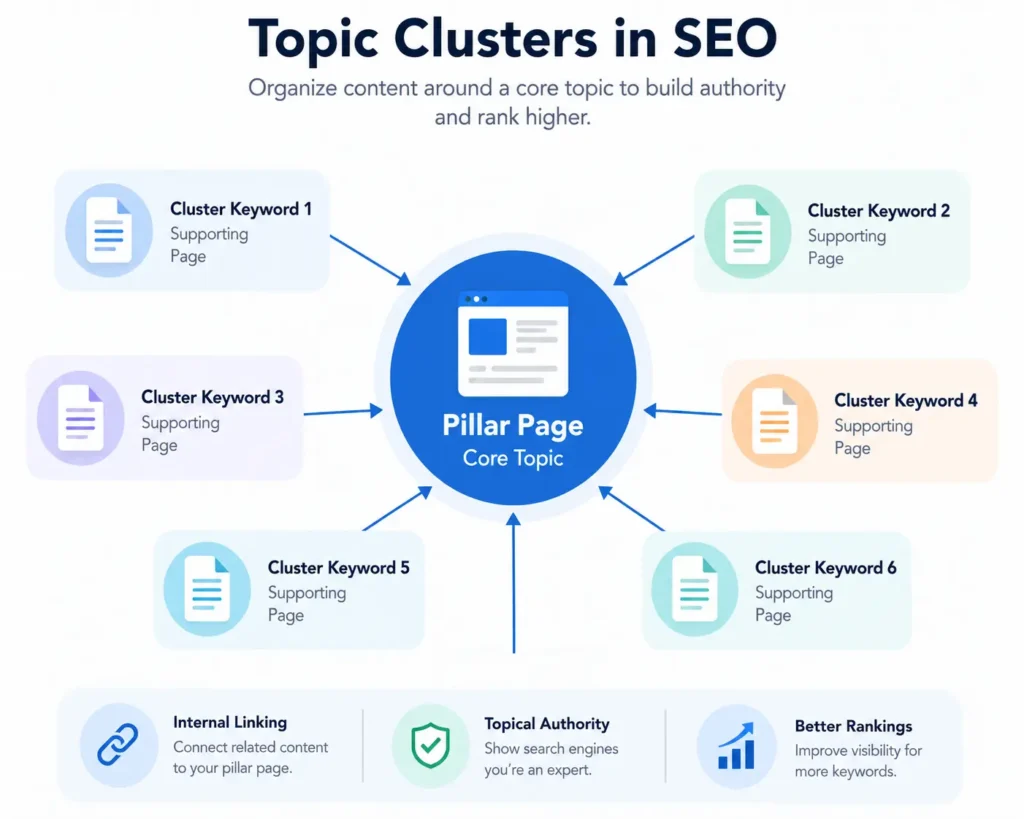
A topic cluster is basically a group of related keywords organised around one core theme, usually built around a central “pillar” page with smaller, more specific pages linking back to it. Instead of publishing random unrelated articles and hoping something ranks, clustering signals to Google that your site has real depth on a topic — not just one lucky post.
Here’s how I approach it:
- Start with your pillar topic. This is usually your broadest, highest-value keyword from earlier steps, something with strong search volume and genuine relevance to your business.
- Group your long-tail and related keywords underneath it. Each of these becomes its own supporting page, targeting a more specific angle or sub-question of the pillar topic.
- Look for natural overlaps. If several keywords are asking almost the same question with slightly different phrasing, they can usually live on the same page instead of being split into separate ones.
- Map the internal linking early. Every cluster page should link back to the pillar, and the pillar should link out to each cluster page. This is what actually builds topical authority over time, not just individual rankings.
I do this manually with a spreadsheet — one tab per pillar topic, one row per keyword, with a column for which page it’ll live on. It’s not glamorous, but it’s saved me from publishing overlapping content that ends up competing against itself, which is a mistake I made plenty of times before I started clustering properly.
Once your clusters are mapped out, you’re no longer looking at “a list of keywords” — you’re looking at a content plan.
Step 9 – Prioritise the Best Keywords
You’ve got clusters mapped out now, but here’s the reality: you can’t write every single keyword-driven page at once. This is the step where you decide what actually gets written first — and getting this order right can be the difference between seeing results in a month versus waiting a year.
I always come back to the goal from Step 1 here. If your goal is quick traffic wins, you’ll prioritise differently than if you’re playing a longer authority-building game. There’s no universal “right” order — just the right order for what you’re trying to achieve.
That said, here’s the framework I lean on most often:
- Relevance first, always. A keyword that’s low-competition but has nothing to do with what you actually offer isn’t a priority — it’s a distraction, no matter how good the numbers look.
- Low competition, decent volume. These are your quick wins. If you’re a newer site especially, chase these before going after the big, competitive terms.
- Business value over pure traffic. A keyword that brings in 100 visitors who are ready to buy beats one that brings in 1,000 visitors who never convert.
- Content you can genuinely do well. If a competitor’s ranking page is a masterclass and you can’t realistically match or beat it right now, deprioritise that keyword until you’re ready to actually compete.
- Existing momentum. Keywords close to pages you already rank for, even on page two, are often faster wins than starting completely from scratch.
A simple trick I still use: score each keyword 1–5 on volume, difficulty (reversed, so lower difficulty scores higher), and business relevance, then add them up. It’s not scientific, but it forces you to look at every keyword through more than one lens instead of chasing the biggest volume number on the page.
Once you’ve got your list ranked, you’ve officially got a content calendar — not just a keyword list.
Step 10 – Create a Keyword Map
This is the final step, and honestly, it’s the one that ties everything else together. A keyword map is exactly what it sounds like — a document that assigns each keyword you’ve researched to a specific page on your site, so nothing you’ve done in the last nine steps goes to waste sitting in a spreadsheet.
Without this step, it’s easy to lose track of what you’ve already planned, end up writing two pages targeting the same keyword, or forget entirely about a great long-tail term you found back in Step 7. A keyword map keeps everything organised in one place you can actually act on.
Here’s what I include in mine, at minimum:
- Primary keyword — the main term each page is built around.
- Secondary/supporting keywords — related terms that page can also realistically rank for.
- URL or page title — where this keyword lives, whether it’s an existing page or one you still need to create.
- Search intent — informational, commercial, transactional, etc., so the content matches what the searcher actually wants.
- Cluster/pillar — which topic cluster from Step 8 this page belongs to.
- Status — planned, in progress, published, or needs updating.
You don’t need fancy software for this. A simple spreadsheet works fine — I still use one myself, and it’s genuinely one of the most-referenced documents in my entire content workflow. Every time I plan a new article, this is the first place I check, not a keyword tool.
Once your map is built, keyword research stops being a one-time task you did months ago and becomes something you can actually maintain, update, and grow from — which is really the whole point.
Common Keyword Research Mistakes to Avoid
I’ve made almost every mistake on this list at some point — some of them more than once, embarrassingly. So instead of just listing generic pitfalls, let me walk you through the ones that actually cost me time (or clients) so you can skip straight past them.
- Chasing volume like it’s the only metric that matters
Early on, I picked a keyword purely because the volume looked impressive — thousands of searches a month, seemed like a no-brainer. The page ranked, traffic came in, and almost none of it converted. Turns out the intent behind that keyword had nothing to do with what I was offering. Volume without intent is just a vanity number. - Going after keywords way above your site’s weight class
If your site is brand new, competing directly for a keyword dominated by established, high-authority domains is a losing game — not because your content is bad, but because Google simply hasn’t built enough trust in your site yet. I’ve watched clients burn months chasing a “perfect” keyword that was never realistically winnable at their stage. - Treating research as a one-and-done task
I used to build a keyword list once, use it for a year, and never touch it again. Search behaviour doesn’t sit still — new competitors show up, trends shift, and keywords that worked in January can go stale by summer. Now I revisit my keyword strategy every few months, and it’s caught opportunities I would’ve completely missed otherwise. - Stuffing the keyword everywhere “just to be safe”
This one’s old-school advice that refuses to die. Repeating your exact keyword every other sentence doesn’t help you rank anymore — it just makes the content harder to read, and readability is a big part of on-page SEO Google evaluates now. - Trusting one tool’s numbers as gospel
Every keyword tool estimates volume and difficulty a little differently, sometimes wildly so. I always cross-check at least two sources before deciding a keyword is worth targeting — relying on a single number has burned me more than once. - Skipping long-tail keywords entirely
It’s tempting to only chase the big, broad terms, but that’s exactly where the competition is fiercest. Some of my best-performing pages target long-tail phrases with modest volume — because they’re easier to rank for and the traffic they bring converts far better. - Forgetting to map keywords to actual pages
Without a clear map, it’s easy to accidentally target the same keyword on two different pages, splitting your ranking potential instead of building it. I learned this one the hard way after watching two of my own pages quietly compete against each other for months before I noticed.
None of these are fatal mistakes — I’m proof of that. But catching them early will save you the months of trial and error it took me to learn them the first time around.

Do Keyword Research the Right Way with Tsabit Insight
Keyword research isn’t something you do once and forget — it’s a living part of your SEO strategy, one that needs revisiting as trends shift and your business grows. If you’ve made it this far through the guide, you already know there’s a lot of moving pieces to manage well. The good news is, you don’t have to manage all of it alone.
At Tsabit Insight, I provide freelance SEO services built around exactly this kind of process — uncovering the right keywords, mapping them to the right pages, and turning research into content that actually ranks and converts. Every project starts with understanding your goals and audience, the same way this guide does, before any tool or spreadsheet gets involved. Whether you’re starting from scratch or trying to fix a keyword strategy that’s stalled, the approach stays grounded in what genuinely drives results — not just what looks good in a report.
If you’re looking for a reliable freelance SEO specialist to guide your keyword strategy in the right direction, get in touch to discuss your project and discover how Tsabit Insight can help your business grow through smarter, more targeted search visibility.
FAQ