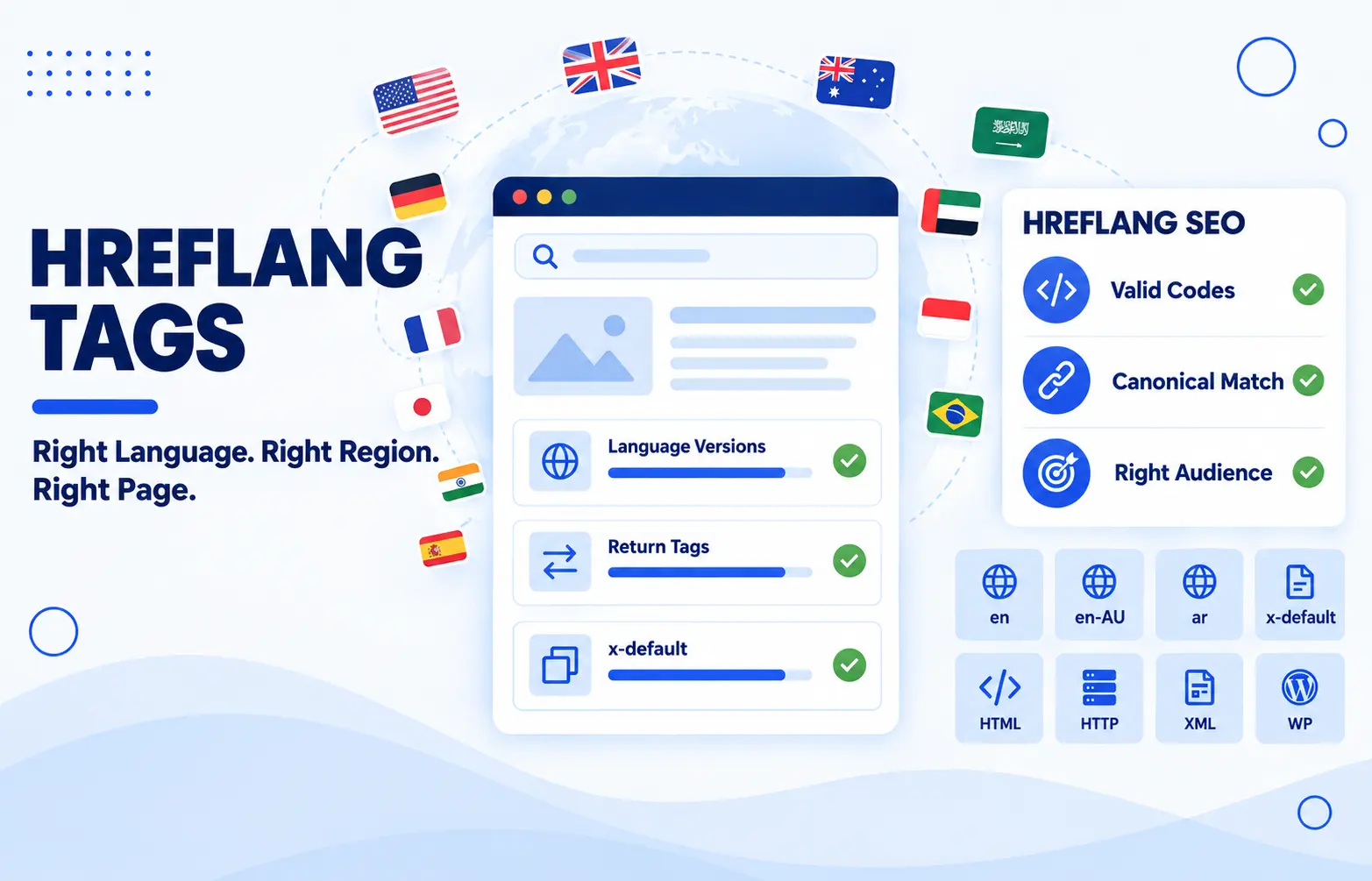
Hreflang Tags Guide for Multilingual and Multi Regional Websites
Hreflang Tags are one of those small technical details that can quietly make or break how your international audience experiences your website. It happens more often than you would think. Someone in Melbourne searches for a service, and Google sends them to a page written for readers in the United States, complete with American spelling and prices in the wrong currency or an Arabic-speaking visitor lands on English content, even though a polished Arabic version has been sitting on the same site the whole time.
If that sounds familiar, you are not alone, and the good news is that it is very fixable. Stick with me and I will walk you through what these tags do, how to set them up properly, and how to avoid the little traps that catch so many websites.
What Are Hreflang Tags?
Hreflang tags are small pieces of code that tell search engines which language and regional version of a page is meant for which audience. That is the definition in plain terms, and at its core it really is that simple. If your website has the same content in more than one language, or in the same language for different countries, hreflang is how you point Google to the right localised version for each person searching.
Think of it like a receptionist at a busy office. Someone walks in, and instead of guessing where they should go, the receptionist works out who they are and sends them to the right desk. Hreflang does exactly that for your pages. A reader in Perth gets your Australian English page, with prices in AUD and spelling they recognise. A reader in Riyadh gets your Arabic page. Everyone lands where the content was actually written for them.
Here is what it looks like in your page code.
<link rel="alternate" hreflang="en-AU" href="https://example.com/au/" />
<link rel="alternate" hreflang="en" href="https://example.com/" />
<link rel="alternate" hreflang="ar" href="https://example.com/ar/" />
Each line names a version of the page and says who it is for. Google reads these lines, works out how your pages relate to each other, and uses that to show the most suitable one in the search results.
How Does Hreflang Work?
Hreflang works like a set of signposts between your pages. Once they are in place, the process behind the scenes is quite straightforward.
First, Google crawls your page and reads the hreflang tags in it. Second, it follows those tags to your other versions and builds a small group of pages that all cover the same content for different audiences. Third, when someone searches, Google looks at their language and location and swaps in the version from that group that suits them best. So a searcher in Adelaide sees your en-AU page, even if the page that originally ranked was your global English one.
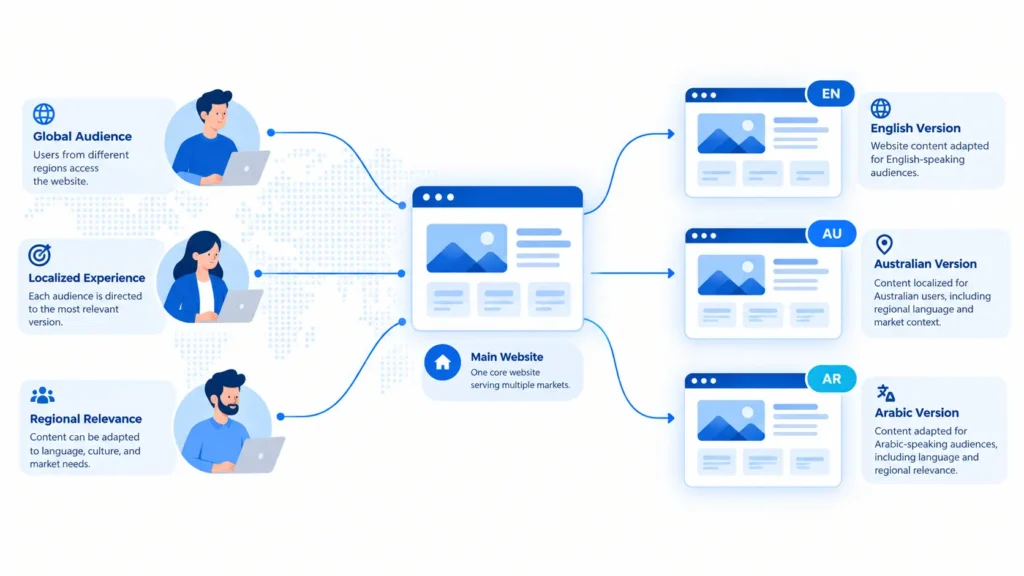
That brings me to something worth knowing. Hreflang does not act as a ranking boost. It changes which version gets shown once the ranking work is done. Your pages still need to earn their positions through quality content and solid SEO, and hreflang simply makes sure the right one takes the spot.
Return Tags and Self Reference
Here is where many setups quietly fall apart. Every page in the group must point to every other page, and every page must point back. These are called return tags. If your Australian page points to your Arabic page, the Arabic page must point straight back to the Australian one. When one side is missing, Google can ignore the tags altogether, because it cannot be sure the two pages are genuinely related. Think of it like a handshake, because it only counts when both sides reach out.
Each page also needs to include a tag that points to itself. That is the self reference. It feels odd at first, since a page pointing to itself seems redundant, but it completes the group and tells Google that this version is a proper member of the set.
Both pages carry the exact same set of tags, which covers the return tags and the self reference in one go.
Hreflang Is a Signal, Not a Directive
Now for a little honesty. Hreflang is a strong hint, not a command. Google can still choose to show a different version if it believes another page suits the searcher better. This can happen when the content differs too much between versions, when the tags contain errors, or when other signals on your site point in a different direction.
So your goal is to give Google clear and consistent signals so the hint gets followed. Clean tags, matching content, and working pages all help. One more thing worth knowing is that Bing pays less attention to hreflang and leans more on the content language tag, so if Bing traffic matters to your business, keep that tag in place as well.
Hreflang vs lang Attribute
Now let’s clear up the mix up I mentioned earlier. Hreflang and the lang attribute look like close cousins, so it is easy to assume one can stand in for the other. They cannot. Both deal with language, but they speak to completely different readers.
The lang attribute describes the language of the content on a page. It sits on the HTML element and is written for browsers, screen readers, and translation tools. Hreflang, on the other hand, describes how your pages relate to each other across languages and regions. It is written for search engines.
Here is a simple way to picture it. The lang attribute is the label on a box that says what is inside. Hreflang is the map that shows where the other boxes are stored and which customer each one belongs to.
So what does this mean for you in practice? The lang attribute will not help the right page show up in the right country. Search engines mostly work out the language from the text your visitors can actually read, so lang alone cannot do the job of hreflang. And the reverse is true as well. Hreflang will not fix accessibility. A screen reader relies on lang to pick the right pronunciation, so without it an Arabic page might be read aloud as if it were English.
There is a handy bonus on the Australian side too. When your page is written for Australian readers, lang="en-AU" lets browsers and spell checkers treat the text as Australian English, so words like organise and colour are not flagged as mistakes.
The answer is to use both and keep them consistent. If your hreflang tag says a page is Australian English, the lang attribute on that page should say the same. Here is how that looks on the Australian version of a page.
<html lang="en-AU">
<head>
  <link rel="alternate" hreflang="en-AU" href="https://example.com/au/" />
  <link rel="alternate" hreflang="ar" href="https://example.com/ar/" />
</head>
Both use the same style of language codes, which is why they get mixed up so easily. Just remember that one talks to your visitors’ tools and the other talks to search engines.
Also Read:The Complete Guide to Technical SEO And Why Your Content Isn’t Ranking Without It
When Should You Use Hreflang Tags?
Here is the question I hear a lot. Do I really need hreflang, or am I overcomplicating things? The honest answer is that it depends on what your website looks like. Hreflang earns its place when you have more than one version of the same page for different languages or regions. If that describes your site, it is worth setting up. If it does not, you can skip it and save yourself the effort.
- You publish the same content in different languages
This is the classic case. Say your service page exists in English and Arabic. Hreflang tells Google that these two pages are translations of each other, so an Arabic speaker gets the Arabic page and an English speaker gets the English one. - You use the same language for different countries
This one surprises people, especially in Australia. English in Australia and English in the United States are not identical, and neither are the prices, currencies, shipping details, or legal notes that go with them. An Australian reader expects prices in AUD with GST included, spelling like colour and organise, and delivery times that make sense locally. When the language is the same but the details change, hreflang helps Google show each audience the version built for them. - You translate only part of the page
Sometimes the menu, buttons, and layout are translated while the main content stays in the original language. Google treats those pages as separate versions too, and hreflang keeps them from getting tangled up.
Now for the other side of the story. You do not need hreflang if your website has one language and one audience. A Sydney business that only serves Australian customers in English has nothing to connect, so the tags would have nothing to point to.
There is one more case worth a warning. If two regional pages are exact copies, with the same text, the same prices, and the same details, hreflang will not make them useful. You are better off merging them into a single page unless you plan to tailor each one properly.
Understanding Hreflang Language and Country Codes
This is the part where most hreflang setups go wrong, and it is rarely because of anything complicated. It usually comes down to one wrong letter in a code. The good news is that the rules are short, and once you know them you can spot a bad code from across the room.
Every hreflang value follows the same pattern. You write the language first and, if you need it, the country second, joined together in one value. So a page for English speakers in Australia becomes en-AU, and a page for Arabic speakers in Saudi Arabia becomes ar-SA.
Language Codes (ISO 639-1)
Language codes are two letter codes, written in lowercase. Here are the ones you will meet most often.
enfor Englisharfor Arabicidfor Indonesianfrfor Frenchesfor Spanishjafor Japanese
The language code is the only required part. If your Arabic page is the same for every Arabic speaker, then hreflang="ar" on its own is all you need. Adding a country would only make things more complicated for no benefit.
Country Codes (ISO 3166-1 Alpha 2)
Country codes are also two letters, and by convention they are written in uppercase. These are the common ones.
AUfor AustraliaNZfor New ZealandUSfor the United StatesGBfor the United KingdomSAfor Saudi ArabiaAEfor the United Arab Emirates
Here is the rule to remember. A country code never works on its own. It always has to follow a language code, so AU by itself means nothing, while en-AU does the job perfectly.
You also do not need a country code every time. Only add one when you have different versions of the same language for different countries. For example, if your Australian page uses AUD pricing and Australian spelling while your American page uses USD and American spelling, each one earns its own country code. Here is what a setup with both looks like.
<link rel="alternate" hreflang="en-AU" href="https://example.com/au/" />
<link rel="alternate" hreflang="en-NZ" href="https://example.com/nz/" />
<link rel="alternate" hreflang="en-US" href="https://example.com/us/" />
<link rel="alternate" hreflang="ar" href="https://example.com/ar/" />
Three English versions for three countries, and one Arabic version for everyone who reads Arabic.
Common Code Mistakes
Even experienced people trip over these, so take a moment to check your own setup against them.
- Writing
en-UKinstead ofen-GB. The country code for the United Kingdom is GB, and UK is not valid. - Writing
en-AUSinstead ofen-AU. Country codes always have exactly two letters, so the three letter version will not work. - Writing
jpinstead ofja. Japan is the country, but Japanese is the language, so the language code is what belongs here. - Using a country code alone, such as
hreflang="AU". It has to be paired with a language. - Using an underscore, such as
en_AU. The separator has to be a hyphen, so it should been-AU. - Targeting regions that are not countries, such as
en-APACfor Asia Pacific oren-EUfor Europe. Hreflang only works with real countries.
Always check your codes against the official lists before you publish. One wrong character can make Google ignore the tag entirely, and nothing on your page will warn you when it happens.
What Is hreflang="x-default"?
The x-default value is a special hreflang setting that tells Google which page to show when none of your language or regional versions match the searcher. In simple terms, it is the fallback page for everyone your other tags do not cover.
Here is when that matters. Say you have an Australian English page and an Arabic page, and someone in Brazil searches in Portuguese. Neither of your versions was made for them, so which page should Google show? Instead of leaving Google to guess, x-default lets you decide ahead of time. Think of it as your safety net.
Most websites point it to one of two places.
- Your main global page, usually an English version that works for a broad audience
- A language selector page, where visitors choose their own language or country
Both options are valid, so pick the one that suits how your site works. If you can offer a page that makes sense to almost anyone, use it. If your audience is spread across many languages and no single page fits, a selector page gives people a friendly way to find their own version.
Now here is the part I want you to remember. The x-default value is not a ranking boost, and it does not replace your other tags. It only handles the searchers who fall outside them. Your regular language and country tags still do the main job, and x-default quietly covers the gaps.
Also Read: Multilingual SEO That Actually Gets Your Content Found in Every Language
Hreflang Tags vs Canonical Tags
A canonical tag is a line of code that tells search engines which URL is the preferred version when several URLs show the same or very similar content. Hreflang tags do a different job. They tell search engines which version of a page is meant for which language or region. One picks a favourite among duplicates, and the other matches each audience with the right version.
Here is where the confusion starts. Both tags sit in the same place, both point to other URLs, and both deal with pages that look alike. So it is easy to assume they compete or that one can replace the other. They cannot, and they are not supposed to. Canonical tags and hreflang tags work best as a team, with each one covering what the other does not.
There is one more detail worth checking. The URLs in your hreflang tags should match the canonical URLs exactly. If your hreflang points to a version with tracking parameters or a different trailing slash, Google may see it as a mismatch and skip the tag. Keep your URLs clean and consistent across both.
A quick reminder for pages in the same language too. If your Australian and American pages share almost identical text, Google may treat them as duplicates anyway. Tailor each version with local pricing, GST details, and local spelling so every page gives its audience a real reason to exist.
How to Implement Hreflang Tags
Implementing hreflang means adding annotations to your site that tell search engines which language and regional versions of a page exist and who each one is meant for. The annotations are the same no matter how you add them. What changes is where you place them, and you have three options. You can put them in the head section of your HTML, in your HTTP headers, or in your XML sitemap.
Here is the good news. Google treats all three methods as equal, so none of them ranks better than the others. The best method is simply the one that fits your site and that you can keep accurate over time. Let’s go through each one so you can pick with confidence.
1. HTML Link Elements
This is the method most people start with, and for good reason. You add a link element inside the head section of every page, one line for each version, and each line names a language or region and the URL that serves it. It is easy to read, easy to inspect in your browser, and easy to test.
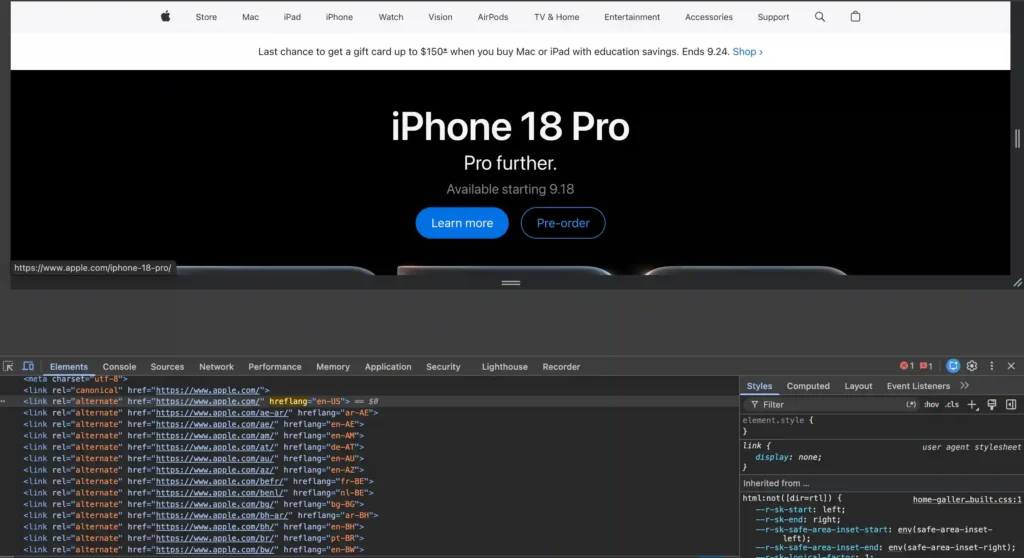
There is one drawback to know about. Every extra version adds another line to every page. With two or three versions that is nothing, but on a site with fifteen languages and regions, each page carries fifteen lines, and keeping all of them in sync by hand becomes a real chore. That is when the other methods start to look attractive.
2. HTTP Headers
HTTP headers are the answer when the file you want to annotate is not an HTML page. A PDF is the classic example. A PDF has no head section, so there is nowhere to place a link element. Instead, your server sends the hreflang information along with the file itself, in the response headers.
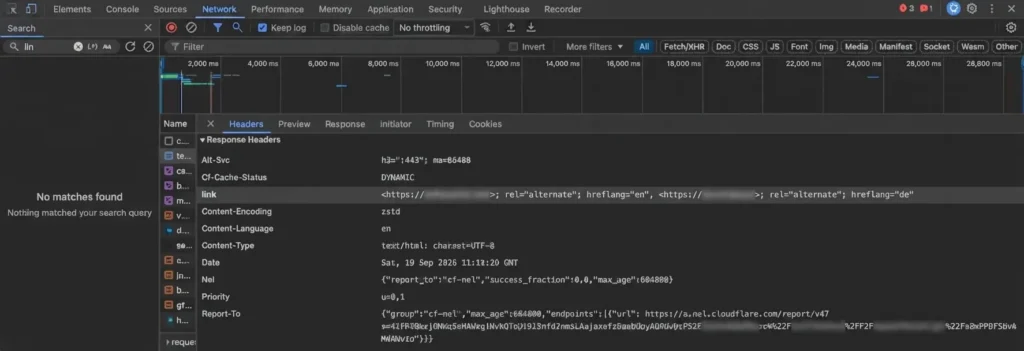
You set this up on your server, for example in an Apache configuration file or an Nginx setup. It is a more technical job, and it usually needs a developer or someone comfortable with server settings. For most everyday websites, this method is rarely needed. I would only reach for it when you publish downloadable files in several languages and want each one to reach the right audience.
3. XML Sitemaps
An XML sitemap lets you keep all your hreflang information in one central file instead of scattering it across thousands of pages. Each page gets its own entry in the sitemap, and inside that entry you list every version of the page, including the page itself. Your page code stays clean, and updating a version means editing one file instead of many.
Here is a simplified example with two pages.
<urlset xmlns="http://www.sitemaps.org/schemas/sitemap/0.9"
        xmlns:xhtml="http://www.w3.org/1999/xhtml">
  <url>
    <loc>https://example.com/au/</loc>
    <xhtml:link rel="alternate" hreflang="en-AU" href="https://example.com/au/" />
    <xhtml:link rel="alternate" hreflang="ar" href="https://example.com/ar/" />
    <xhtml:link rel="alternate" hreflang="x-default" href="https://example.com/" />
  </url>
  <url>
    <loc>https://example.com/ar/</loc>
    <xhtml:link rel="alternate" hreflang="en-AU" href="https://example.com/au/" />
    <xhtml:link rel="alternate" hreflang="ar" href="https://example.com/ar/" />
    <xhtml:link rel="alternate" hreflang="x-default" href="https://example.com/" />
  </url>
</urlset>
Notice that both entries carry the same set of lines, just like they would in the head section. The same rules apply here, so use full URLs and keep the groups complete on both sides. The extra xmlns:xhtml line at the top is what allows the sitemap to understand the hreflang lines, so do not leave it out.
The main drawback is that the sitemap can grow very large on sites with many pages and many versions, since every entry repeats the full list. It also asks you to keep the sitemap accurate whenever you add, remove, or rename a page. A sitemap that goes out of date is worse than no sitemap, because it sends search engines to pages that no longer exist.
Which Method Should You Choose?
The right choice comes down to the size of your site and how it is built. If your site is small and has only a few versions, such as an Australian page, a global page, and one or two translations, the HTML method is the simplest place to start. You can see the tags on the page, check them quickly, and fix mistakes without any special access.
If your site is large, like an Australian online store with thousands of products across several regions, the sitemap method is much easier to manage, because one file controls the whole setup. If you need to cover PDFs or other files that are not web pages, HTTP headers are the only practical option.
One rule matters more than any of these. Choose one method and stay with it. If you add tags in the head and also list them in a sitemap, the two can disagree over time, and conflicting signals are exactly what weakens hreflang. Pick one home for your tags, keep it tidy, and let it do its job.
Hreflang Tags and JavaScript
Hreflang tags and JavaScript meet when the hreflang annotations are not in the HTML your server sends, and a script adds them to the page after it loads in the browser. In other words, if you view the raw source of the page you will not see the tags, but if you inspect the page after it has fully loaded, they suddenly appear.
This happens more often than you might expect, and it sits right where international SEO meets JavaScript SEO. Some single page applications build the whole head section with a script, which is common on Australian online stores built with modern frameworks. Some teams add hreflang through a tag manager because it saves a developer request. Some frameworks generate tags in the browser by default. All of these can work, but they add a layer of risk that plain HTML never has.
Can Google Read Hreflang Added by JavaScript?
Yes, Google can read it, and that is where many people stop worrying. The catch lies in how Google gets there. Google first crawls the raw HTML of your page, and only later renders it with JavaScript in a separate step. Tags added by a script are invisible until that second step happens. Sometimes the wait is only a few seconds, but Google itself says it can take longer. If rendering is delayed, or a script fails, or a file the script depends on is blocked, your hreflang tags simply never arrive.
Other crawlers are less predictable. Google’s own documentation reminds site owners that not every bot can run JavaScript, and even SEO tools that audit your site may report your hreflang as missing if they are not set to render JavaScript. So a setup that looks fine in Google can look broken elsewhere.
Here is what a script that adds hreflang tags often looks like.
<script>
  const versions = [
    { lang: "en-AU", url: "https://example.com/au/" },
    { lang: "ar", url: "https://example.com/ar/" },
    { lang: "x-default", url: "https://example.com/" }
  ];

  versions.forEach(function (v) {
    const link = document.createElement("link");
    link.rel = "alternate";
    link.hreflang = v.lang;
    link.href = v.url;
    document.head.appendChild(link);
  });
</script>
This works in a browser, and Google can usually process it. But every tag now depends on that script running perfectly, every time, on every page.
The Safer Approach
Good JavaScript SEO comes down to one simple habit, which is never leaving an important signal at the mercy of a script. The most reliable setup is to have your hreflang tags present in the HTML the server sends, before any JavaScript runs. That way, every search engine sees them immediately, and there is nothing to wait for or break. Google’s own guidance agrees, noting that server side rendering or pre rendering remains a smart approach because it helps both users and crawlers.
If you use a modern framework such as Next.js or Nuxt, this is usually a matter of using server side rendering or static generation, so the head section is built before the page reaches the browser. If your site is built on a traditional CMS, the tags are normally output in the HTML already. And if you truly cannot avoid JavaScript, treat it as a backup plan rather than the main plan. Consider moving your hreflang into an XML sitemap instead, since that does not depend on rendering at all.
The Language Redirect Trap
There is one more JavaScript habit that quietly ruins hreflang setups. Some sites automatically redirect visitors to a language or regional version based on their location or browser settings. It feels helpful, but it can stop search engines from ever reaching your other versions. Google’s documentation explains that the default IP addresses of Googlebot appear to be based in the United States, and that its requests do not carry a language preference. Google also crawls from IP addresses in other countries, but you should not count on it reaching every version through a redirect.
Picture a script that sends every visitor from a US location to your global English page. If Googlebot arrives from the US, it may never see your Australian and Arabic pages at all. The fix is to make sure every version lives on its own URL that anyone can reach directly, with no forced redirect. Google itself recommends using separate URLs for each language version instead of adjusting the content with cookies or browser settings. If you still want to help visitors find their own version, show a small banner that suggests it and let them choose. Let hreflang handle the search results, and let the banner handle the human touch.
Hreflang for WordPress Websites
Hreflang for WordPress means using a multilingual plugin or a small piece of custom code so your site outputs the right hreflang tags for every translated or localised version of a page. WordPress on its own has no built in way to create translated versions, so there is nothing for hreflang to point at until you add translations. How you add them decides how you handle the tags. Most people use a multilingual plugin, often alongside Yoast SEO, and a few prefer the manual route.
1. Using Multilingual Plugins
The three names you will meet most often are Polylang, WPML, and TranslatePress. All of them create your hreflang tags for you, which saves you from the return tag and self reference headaches we covered earlier. WPML inserts hreflang tags automatically and updates them as your site changes, and Polylang adds the tags to both pages as soon as you link a page to its translation. TranslatePress follows the same idea.
Here is the catch, though. Automatic does not always mean correct. Your plugin builds each code from the language and locale you choose, so a wrong locale setting quietly produces a wrong tag. Polylang, for example, turns a locale like en_AU into en-AU for you. If you pick English (United States) as the locale for your Australian page, the tag will say en-US, and Google will treat that page as meant for American readers. So choose the locale that matches who the page is really for.
Next, look at your x-default. Depending on your plugin and settings, it may be missing from some pages. Check your page source first. If it is not there, Polylang offers a small filter that adds it, and you only need to swap en for the slug of your default language, which is usually your global English page.
add_filter( 'pll_rel_hreflang_attributes', function ( $hreflangs ) {
    $hreflangs['x-default'] = $hreflangs['en'];
    return $hreflangs;
} );
There’s one more thing you need to watch out for. Use one source for your hreflang tags and stick to it. If your multilingual plugin already generates them while your SEO plugin or theme adds another set, you can end up with duplicate tags that are difficult to troubleshoot. Google itself says there’s no benefit to combining different methods, and managing multiple methods at the same time can make things much harder to maintain.
2. Adding Hreflang Manually
Sometimes, a plugin can be more than you actually need. For example, you might run a small website with only a few translated pages, or manage each language version separately. In that case, you can add hreflang tags manually using a short snippet that hooks into the <head> section of your pages.
The idea is straightforward. You store the full URL of each language version in a custom field on the page, and the snippet then outputs the hreflang tags in the <head>. Here’s a basic example for an English and an Arabic page.
add_action( 'wp_head', function () {
    if ( ! is_singular() ) {
        return;
    }

    $versions = array(
        'en'        => get_post_meta( get_the_ID(), 'hreflang_en', true ),
        'ar'        => get_post_meta( get_the_ID(), 'hreflang_ar', true ),
        'x-default' => get_post_meta( get_the_ID(), 'hreflang_en', true ),
    );

    foreach ( $versions as $lang => $url ) {
        if ( $url ) {
            printf(
                '<link rel="alternate" hreflang="%s" href="%s" />' . "\n",
                esc_attr( $lang ),
                esc_url( $url )
            );
        }
    }
} );
Two habits will help keep this method safe. First, fill in the same custom fields on every version of the page, so each one points to the others and to itself. If you skip this step, the return tags can break, which is exactly the issue we discussed earlier. Second, add the snippet through a child theme or a code snippets plugin rather than directly into your main theme, and always keep a backup before making any changes. A theme update can wipe out changes you’ve made in the wrong place.
Because the tags are generated by the server, they are included in your HTML before any JavaScript runs, which is the safer setup we discussed in the previous section. If your website grows significantly, moving the same information into an XML sitemap will be easier to maintain.
3. Hreflang With Yoast SEO
Hreflang with Yoast SEO means pairing Yoast SEO with a multilingual plugin, because Yoast SEO does not create hreflang tags on its own. This can catch a lot of people out. Yoast is one of the first SEO plugins many of us install, so it’s easy to assume it handles everything. Yoast’s own support team has said that the plugin has no multilingual features, so it does not output hreflang tags, and recommends using a multilingual plugin instead.
So, what does Yoast do in a multilingual setup? It handles the on-page side. Yoast manages your titles, meta descriptions, canonical URLs and XML sitemaps, while your translation plugin manages the language versions and hreflang tags. They work together, with each tool covering what the other doesn’t.
The plugin you pair with Yoast determines where your hreflang tags are placed. With Polylang, the plugin outputs the tags in the <head> of your pages itself, as we covered earlier, while Yoast simply continues with its usual SEO functions. With WPML, the tags are added directly to the XML sitemap by default when it works alongside Yoast, and they only appear in the raw XML, not in the page source. If you’d prefer to have them in the <head> section, WPML’s support team points to a setting called Display alternative languages in the HEAD section within WPML’s SEO options. Whichever location you use, remember where your tags are placed, because you’ll need to check the right location when validating them.
How to Check and Validate Hreflang Tags
Checking and validating hreflang tags means confirming that every tag on your site is present where search engines can read it, uses valid codes, and is confirmed by return tags from every other version. It is the step people skip most often, and it is the one that decides whether all your earlier work actually pays off. A tag that looks fine to you can still fail quietly, so a few minutes of testing is worth far more than hours of guessing.
1. Start With View Source and Inspect
The simplest check needs no special tools, just your browser. There are two views worth using, and they show you two different things. View Source shows the raw HTML your server sends. Inspect shows the page after your browser has run every script, which is much closer to what Google sees once it renders the page.
Begin with View Source. Right click on the page, choose View Page Source, and search for “hreflang” using Ctrl+F on Windows or Cmd+F on a Mac. Then repeat the search with Inspect. Right click on the page, choose Inspect (or press F12 on Windows, or Cmd+Option+I on a Mac), open the Elements tab, and search for “hreflang” inside the head section.
Now compare the two results. If the tags appear in both views, they are already in your HTML when the page loads, which is the safest setup. If they appear only in Inspect, a script is adding them after the page loads, and that is a warning sign worth fixing, as we discussed in the JavaScript section.
One thing surprises many site owners. Search Console no longer flags hreflang errors for you. The old International Targeting report, which used to do exactly that, was retired by Google in 2022. Hreflang itself is still fully supported, but you now have to find the problems yourself.
2. Crawl Your Whole Site
Checking one page at a time only works for small sites. A crawler tests every page and every link between versions in one go, which is how you catch the mistakes that no human would spot. Screaming Frog is a popular choice, and it has a dedicated hreflang section with filters for the most common problems, such as missing return links, invalid language or region codes, and hreflang URLs that do not return a 200 status.
When the crawl finishes, focus on the issues that do the most damage. Missing return links come first, because one side of a relationship is ignored when the other side does not confirm it. Next come URLs that redirect or return errors, since a tag pointing at a broken page achieves nothing. Then look for return links that point to non canonical URLs, which we talked about in the canonical section, and for pages that are set to noindex but still appear in your hreflang groups. Fix the pattern behind a problem rather than one page at a time. If fifty product pages on your Australian store share the same mistake, the cause is usually one setting in your plugin or one line in your template.
3. Keep Checking After You Launch
Hreflang is not a set and forget job. Every time a page is deleted, redirected, or renamed, its counterparts in the other versions need to be updated. Yoast’s guide on this topic makes the same point, recommending that you audit your setup regularly and make sure your content team knows how hreflang works, so nobody breaks it by accident. A plugin update, a theme change, or a new region can all shake things loose too, so run a quick crawl after any of them.
If all of this feels like a lot to keep up with, you are not alone. Plenty of site owners would rather hand the checking to someone who does it every day, and that is exactly what the next section is about

Set Up Hreflang Tags the Right Way with Tsabit Insight
Hreflang tags are not something you set up once and forget. Every new page, redirect, or region you add can quietly break the connections you built, so the setup needs regular attention as your website grows. If you have read this far, you already know how many small details have to line up, from valid codes and return tags to canonical URLs and a working x-default. The good news is that you do not have to juggle all of it alone.
At Tsabit Insight, I offer freelance SEO expert services that cover exactly this kind of technical work. That means auditing your current hreflang setup, fixing broken or missing tags, and building a clean structure that helps search engines send each visitor to the right version of your page, whether your site runs on WordPress with a multilingual plugin or on a custom build.
If you are looking for a reliable freelance SEO expert to help your website reach the right audience in every language and region, get in touch to talk through your project and see how Tsabit Insight can help your business grow through smarter, more targeted search visibility.
FAQ