The Complete Guide of JavaScript SEO and How to Get Google to See Your Content
JavaScript SEO is one of those topics that sounds like it belongs to developers until your rankings start slipping and suddenly it becomes your problem too. You’ve built a site that feels alive, buttons respond instantly, content loads without a page refresh, everything moves the way modern users expect. Then you check Google Search Console and half your pages are missing from the index. That gap between what you see in your browser and what Google actually sees is the entire reason this topic exists.
Here’s what nobody tells you when you first hear the term. JavaScript itself isn’t the enemy. Google has gotten remarkably good at rendering it. The problem shows up in the details, the timing of when your content loads, the way your framework structures its output, the small decisions buried in your tech stack that quietly decide whether your best content ever gets seen by the algorithm deciding your rankings.
I’ve spent enough time untangling these issues on real sites to know they rarely announce themselves clearly. A page can look perfect to you and still be nearly invisible to a crawler.
What Is JavaScript SEO?
JavaScript SEO is the process of optimising JavaScript-powered websites so that search engines can properly crawl, render, and index their content. In simpler terms, it’s the set of practices that make sure the content your JavaScript generates actually reaches Google’s index instead of getting lost somewhere between your server and the search results page.
Traditional SEO was built around a simpler model. A server sends HTML, a crawler reads that HTML, and the content gets indexed almost immediately. JavaScript breaks that clean line. Instead of arriving fully formed, a lot of content today gets built in the browser after the initial page load, which means Google has to execute your code before it can see what you’ve actually published. That extra step, called rendering, is where JavaScript SEO earns its place as its own discipline rather than a footnote inside technical SEO.
This matters because most modern websites aren’t simple HTML pages anymore. Single-page applications, frameworks like React and Vue, and dynamic content loading are the default way sites get built now, not the exception. If you’re running any of these, JavaScript SEO isn’t optional extra credit. It’s a core part of making sure the work you put into your content and your site actually pays off in search visibility.
Why Is JavaScript Important for SEO?
JavaScript isn’t important for SEO because Google demands it. It’s important because your users demand it, and Google’s entire job is to rank pages the way people actually experience them. Here’s what that actually means in practice.
- It shapes what Google can see
Google renders your page much like a browser does, then evaluates what that rendered version contains. If your JavaScript fails to execute properly, entire sections of content can disappear from Google’s view even though every visitor sees them fine. - It affects page experience signals
Load speed, interactivity, and layout stability are all tied to how your JavaScript is built and delivered. A framework that renders slowly or blocks content behind heavy client-side execution drags down the same performance metrics Google already factors into rankings. - It influences indexing on two fronts at once
JavaScript affects what gets indexed and how well the page performs once it does. Most SEO factors only touch one of those, which is part of why JavaScript carries extra weight. - It’s the default architecture now, not an exception
Single-page applications, dynamic product listings, and content that loads after a scroll or a click are standard on modern sites. Treating JavaScript as an edge case rather than the norm is usually where problems start. - It rewards the framework decisions you make early
Loading strategy, rendering method, and framework choice carry more weight on a JavaScript-heavy site than they would on a simple static one. Get those decisions right, and JavaScript becomes an advantage instead of a liability.
How Google Processes JavaScript
Before you can fix any JavaScript SEO issue, it helps to actually understand what happens after Googlebot hits your page, because the process isn’t as instant as it feels when you’re the one browsing. Picture it less like a single glance and more like a three act sequence, where each act is a place things can go right or quietly go wrong.
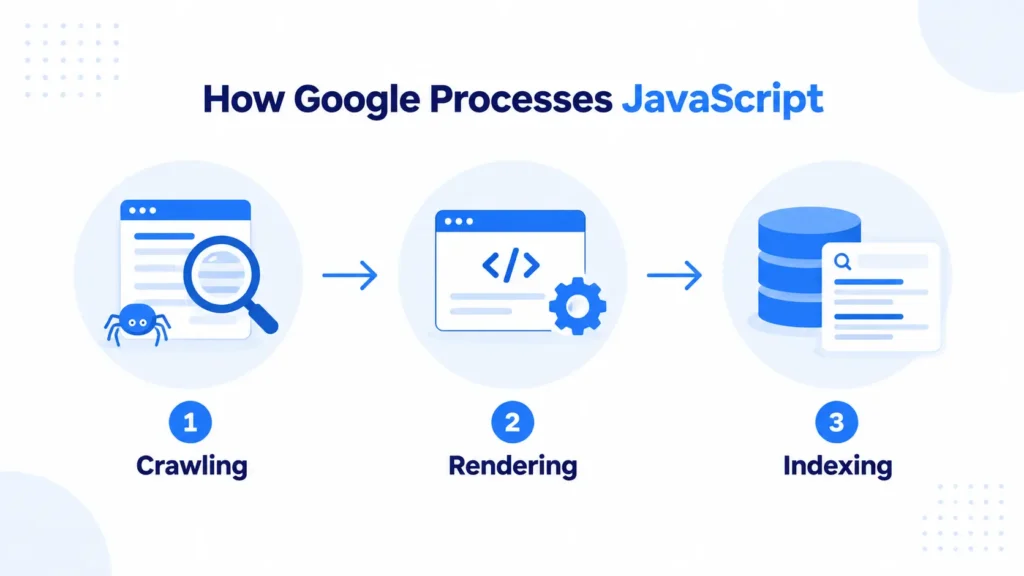
It starts with crawling. Googlebot requests your page the same way a browser would, pulling in the raw HTML response straight from your server. At this point, if your content depends on JavaScript to appear, Google hasn’t actually seen it yet. It’s only holding the skeleton, the bare structure before anything gets filled in.
Next comes rendering, and this is where the real work happens. Google executes your JavaScript using a headless version of Chrome, essentially building the page the way a real visitor’s browser would. Whatever your code generates in this moment becomes the version of your page Google can potentially understand and rank. If a script fails, times out, or depends on something Google can’t access, this is where content quietly gets left behind.
Finally there’s indexing. Once the page is rendered, Google evaluates what it’s looking at, decides how relevant and valuable that content is, and adds it to the index if it earns a place there. Only content that survives all three stages, and survives them correctly, ever gets a real shot at ranking.
Here’s the detail that catches most people off guard. Rendering doesn’t happen at the same moment as crawling. Google often crawls a page, queues it for rendering, and comes back later, sometimes minutes later, sometimes days later, depending on how busy that queue is and how much crawl budget your site has earned.
This gap has a name, the two wave indexing process, and it explains something that confuses a lot of site owners. A brand new page can show up in Search Console as crawled while its actual content still reads as missing or incomplete. If your JavaScript takes too long to execute, or breaks during that second wave, your content ends up stuck in limbo, technically crawled but never properly seen.
How to Test if Google Can See Your JavaScript Content
Before you go hunting for JavaScript SEO problems, you need a way to actually see your page the way Google sees it, not the way it looks in your own browser where everything already works perfectly. A handful of tools make this possible, and each one answers a slightly different question, so let’s go through them one at a time.
URL Inspection Tool
This is the most direct way to check how Google sees a live page, and it lives right inside Google Search Console. When you run a URL through it, Google shows you the actual rendered version of that page, the version that exists after JavaScript has finished executing, rather than the raw HTML your server initially sends out.

What you’re really checking here is whether the content you care about, your headings, your body text, your internal links, actually appears in that rendered output. Click into the “View Tested Page” section and look at the screenshot Google generated alongside the rendered HTML. If your main content shows up clearly, you’re in decent shape.
If it’s missing, thin, or noticeably different from what you see in your own browser, you’ve found a real problem worth chasing down. This tool is also the fastest way to check a single page you’re actively worried about, since results come back within seconds rather than requiring a full crawl.
Rich Results Test
This tool is especially useful if your page depends on structured data, though it’s worth running even if it doesn’t. Like the URL Inspection Tool, it renders your page using Google’s rendering engine and shows you the resulting HTML, but it puts extra emphasis on whether your schema markup gets recognised and validated correctly.

Run your URL through it and check two things. First, does your structured data show up as valid, with no errors or warnings attached. Second, look at the rendered HTML tab and confirm the key text blocks and elements you expect are actually present after rendering.
Since structured data often gets injected dynamically through JavaScript, this test doubles as a way to confirm that injection actually worked, rather than just assuming it did because the code looks correct in your editor.
Disable JavaScript and Reload
This is the fastest manual gut check you can run, and it requires no external tool at all. Open Chrome DevTools, pull up the command menu with Ctrl+Shift+P or Cmd+Shift+P on Mac, type “disable JavaScript,” and reload your page.
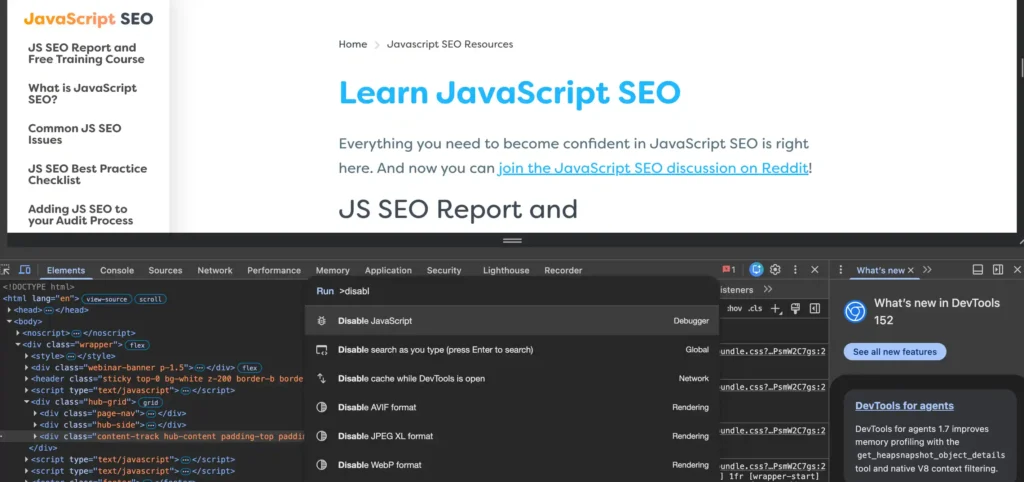
What you’re looking for is simple. If your core content, the text, headings, and links that actually matter for SEO, disappears entirely or turns into a blank shell, that’s a strong signal your page depends too heavily on client-side rendering without any fallback for crawlers that render on a delay or fail to execute your scripts properly.
This test won’t tell you exactly what Google sees, since Googlebot does execute JavaScript unlike this test, but it’s a fast way to gauge how fragile your content structure really is before digging into the more detailed tools above.
Site-Wide Crawling with Screaming Frog
The tools above work well for checking individual pages, but they don’t scale if you’re auditing a site with thousands of URLs. For that, a crawler like Screaming Frog, configured to render JavaScript, becomes essential.
Set the crawler to render pages using its built-in headless Chrome rendering, then compare the rendered HTML against the raw HTML for each URL. Screaming Frog will flag pages where there’s a significant gap between the two, which usually points straight to a rendering problem.
This approach is particularly valuable for catching issues you’d never think to check manually, like an entire product category that renders fine on the pages you happened to test but breaks silently across hundreds of others you didn’t.
Common JavaScript SEO Issues
Once you know how to test for rendering problems, the next step is knowing what you’re actually looking for. Many of these issues overlap with Core Web Vitals, since a page that struggles to render properly for Google is usually the same page struggling to load quickly and stay stable for real users.
If you haven’t already, it’s worth reading through Core Web Vitals separately, because a lot of the fixes below double as performance fixes too. With that connection in mind, here’s what tends to go wrong most often on JavaScript-heavy sites.
- Content hidden behind client-side rendering
When critical text, links, or product details only load after JavaScript executes in the browser, and that execution fails or gets delayed during Google’s rendering queue, the content simply never makes it into the index. - Blocked JavaScript or CSS files
If your robots.txt file accidentally blocks the scripts or stylesheets your page depends on to render properly, Googlebot ends up seeing a broken or incomplete version of the page, even though it never touches the actual content. - Slow rendering and timeouts
Google allocates a limited amount of time and resources to render each page. Heavy scripts, excessive third-party tags, or bloated bundles can cause rendering to time out before your main content ever appears, and this same bloat is usually what drags down your Largest Contentful Paint score too. - Duplicate or missing meta tags from client-side routing
Single-page applications often reuse the same base HTML across multiple routes, and if title tags, meta descriptions, or canonical tags aren’t updated dynamically per page, Google can end up indexing near-identical or conflicting metadata across your site. - Broken internal linking structure
Links that rely on JavaScript click handlers instead of proper anchor tags with real href attributes can be invisible to crawlers, which quietly cuts off the internal link equity your pages need to rank. - Infinite scroll without paginated fallback
Content loaded through infinite scroll often never gets crawled at all, since Googlebot doesn’t scroll or click the way a human visitor does, and without paginated URLs behind the scenes, that content stays effectively orphaned. - Inconsistent rendering between mobile and desktop
Since Google primarily uses mobile-first indexing, JavaScript that behaves differently or fails silently on mobile viewports can cause a real gap between what desktop users see and what actually gets indexed.
How to Optimize JavaScript for SEO
Once you know what tends to go wrong, the next step is doing something about it before you even touch rendering architecture. These are the concrete, tactical fixes that make your JavaScript lighter and faster to execute, which matters regardless of which rendering method you eventually choose.
- Minify your JavaScript files
Stripping out whitespace, comments, and unnecessary characters from your code reduces file size without changing what it does. Most build tools handle this automatically, but it’s worth confirming it’s actually enabled in production rather than assumed. - Defer non-critical JavaScript
Not every script needs to load immediately. Using thedeferorasyncattributes lets the browser render your HTML and CSS first, then load JavaScript afterward, which speeds up how quickly your actual content becomes visible. - Split your code into smaller bundles
Instead of shipping one massive JavaScript file for the entire site, code splitting breaks it into smaller pieces loaded only when needed. This keeps individual page loads lighter and reduces the odds of Google’s renderer timing out on any single page. - Lazy load non-essential content
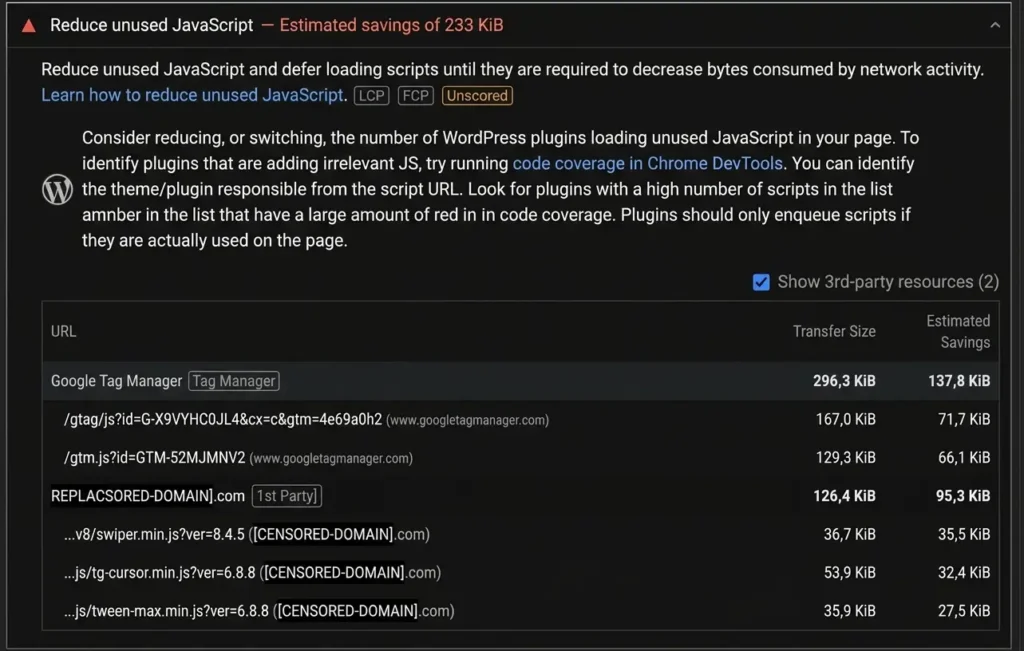
Images, videos, and below-the-fold sections don’t need to load the moment a page opens. Lazy loading defers them until a user actually scrolls close enough to see them, which lightens the initial render without hiding content from crawlers entirely. - Reduce reliance on third-party scripts
Analytics tags, chat widgets, and embedded ads all add their own JavaScript on top of yours, and each one adds to total render time. Auditing which third-party scripts you actually need, and removing the ones you don’t, is often the fastest win available. - Avoid JavaScript for content you don’t need interactive
If a piece of text or a link doesn’t require interactivity, there’s no reason to build it in JavaScript at all. Static HTML for static content removes the rendering risk entirely for that piece of the page. - Cache rendered output where possible
If your setup allows it, caching pre-rendered HTML for pages that don’t change often reduces how frequently your server or Googlebot needs to trigger a fresh render, which saves resources on both ends.
Getting these right doesn’t replace choosing the correct rendering method, but it does make whichever method you choose perform better, since a lighter, well-optimised JavaScript codebase renders faster no matter how it’s ultimately served.
JavaScript Rendering Methods for SEO
Once you understand where rendering problems tend to hide, the next question becomes which rendering approach actually fits your site. There’s no single right answer here, since each method trades off differently between developer experience, performance, and how reliably Google gets to see your content.
Client-Side Rendering (CSR)
This is the default approach for a lot of JavaScript frameworks, and it’s exactly the setup that causes most of the issues covered earlier. With CSR, your server sends a mostly empty HTML shell, and the browser, or Googlebot’s renderer, has to execute JavaScript before any real content appears.
The upside is a smooth, app-like user experience once everything loads. The downside is that you’re placing full trust in the rendering step succeeding, every single time, for every page, before anything gets indexed. On smaller sites this often works fine. On larger ones, or sites with heavy scripts, it becomes the most common source of missing or delayed indexing.
Server-Side Rendering (SSR)
SSR flips the process around. Instead of sending an empty shell, your server executes the JavaScript first and sends fully rendered HTML straight to the browser and to Googlebot. This means content is visible immediately, without waiting on a separate rendering pass, which removes a huge amount of the risk that comes with CSR.
The trade off is server load. Since your server has to render pages on each request, or at least on a caching interval, SSR generally demands more infrastructure than CSR does. For SEO-sensitive pages, that cost is usually worth paying.
Static Site Generation (SSG)
SSG takes the safety of SSR and pushes it even further. Instead of rendering pages on each request, your entire site gets built into static HTML files ahead of time, during a build step, before anyone even visits. Googlebot then receives plain HTML with zero rendering required on its end.
This makes SSG the fastest and most crawler-friendly option available, but it comes with an obvious limitation. Content has to be known at build time. Sites with frequently changing data, like real-time pricing or user-generated content, don’t fit this model well unless paired with periodic rebuilds or a hybrid approach.
Dynamic Rendering
Dynamic rendering is more of a workaround than a long-term architecture, though it still shows up often enough to be worth understanding. The idea is to detect whether a request is coming from a search engine bot or a regular user, then serve a pre-rendered, static version of the page to bots while serving the normal JavaScript-heavy version to everyone else.
Google has been fairly clear that this should be treated as a temporary bridge rather than a permanent fix, mainly because maintaining two separate rendering paths adds complexity and risk. It’s most useful for large, established sites that can’t easily migrate to SSR or SSG in the short term but need an immediate fix for indexing problems.
JavaScript SEO for Popular JavaScript Frameworks
Every framework handles rendering a little differently out of the box, which means the SEO advice that applies to one doesn’t always transfer cleanly to another. Rather than treating JavaScript SEO as one universal checklist, it helps to look at each major framework on its own terms, starting with the one that started this whole conversation around rendering in the first place.
React SEO
React is a library, not a full framework, and that distinction matters more than people realise when it comes to SEO. Out of the box, a plain React app built with something like Create React App renders entirely client-side, which means it inherits every risk covered earlier under Client-Side Rendering.
The initial HTML Googlebot receives is often just a single empty div, with your entire site built afterward through JavaScript. This doesn’t make React bad for SEO. It means React alone isn’t enough, and the real SEO decisions happen in how you choose to render it and configure it around that limitation.
Here’s what actually matters once you’re working with React for an SEO-sensitive site.
- Avoid pure client-side rendering for content-heavy pages
Blog posts, product listings, and anything else you actually want ranking shouldn’t rely on plain client-side React. If migrating to a framework isn’t an option, look into pre-rendering tools or hybrid rendering setups that generate static HTML for those pages ahead of time. - Handle metadata dynamically per route
Since React apps are typically single-page applications, title tags, meta descriptions, and canonical tags need to update per page using something like React Helmet. Without this, every route can end up sharing identical metadata, which confuses both users and search engines. - Keep bundle size under control
React apps tend to accumulate dependencies quickly, and a heavier JavaScript bundle means longer rendering time, which raises the odds of Google’s renderer timing out before your content fully loads. - Consider a framework built on top of React instead of raw React
Most of these issues are exactly why frameworks like Next.js exist, since they solve rendering at the architecture level rather than requiring manual workarounds for every page.
Next.js SEO
Next.js exists largely because React alone left too many SEO decisions in the developer’s hands, so it makes sense that it solves most of what came up in the React section by default rather than requiring manual setup. It’s built on top of React but adds rendering flexibility directly into the framework, letting you choose server-side rendering, static generation, or a mix of both on a page by page basis.
That flexibility is exactly why Next.js has become one of the most SEO-friendly ways to build a React application, but flexibility only helps if you actually use it correctly. Here’s what matters most for SEO once you’re working in Next.js.
- Choose the right rendering strategy per page
Next.js lets you pick Static Site Generation for pages that don’t change often, Server-Side Rendering for pages needing fresh data on every request, or Incremental Static Regeneration for a hybrid that rebuilds static pages periodically. Picking the wrong one for a given page is the most common way sites underuse what Next.js actually offers. - Use the built-in Metadata API for per-page SEO tags
Newer versions of Next.js include a native way to set title tags, meta descriptions, and Open Graph data per route, which removes the need for third-party libraries and keeps metadata consistent across your site. - Take advantage of automatic image optimisation
The built-in Image component handles lazy loading, responsive sizing, and modern formats automatically, which directly supports the Core Web Vitals metrics tied to page experience. - Don’t ignore the App Router versus Pages Router decision
Newer Next.js projects default to the App Router, which changes how rendering and data fetching work under the hood. If you’re maintaining an older Pages Router project, some SEO features and best practices differ slightly, so it’s worth confirming which router your project actually uses before applying advice you find online. - Watch for accidental client-side-only components
It’s easy to mark a component with “use client” out of habit, even when it doesn’t need interactivity, and doing this on content-heavy sections can quietly push that content back into client-side rendering territory, undoing the SEO benefits Next.js is supposed to provide.
Get these right, and Next.js genuinely delivers on what raw React can’t manage without extra tooling. Get them wrong, and you end up with a Next.js site that performs no better for SEO than plain React would.
Vue.js SEO
Vue sits in an interesting spot between React and something like Angular. It’s more approachable than Angular for most developers, but on its own it faces the exact same rendering problem React does. A plain Vue app, especially one built with Vue CLI as a single-page application, ships an empty HTML shell and builds everything client-side, which means it inherits every risk already covered under Client-Side Rendering.
The good news is that Vue’s ecosystem makes solving this fairly straightforward, as long as you know which pieces to reach for. Here’s what actually matters for SEO once you’re working with Vue.
- Don’t ship a plain SPA for content-heavy pages
If your Vue app is client-side rendered by default, blog content, product pages, and anything else meant to rank needs a rendering solution layered on top rather than being left as-is. - Manage metadata per route with a dedicated library
Vue Router alone doesn’t handle title tags or meta descriptions per page, so tools like Vue Meta or the equivalent built into your framework layer are necessary to avoid every route sharing identical metadata. - Watch how Vue Router handles navigation
Vue’s routing typically updates the DOM without a full page reload, which is great for user experience but means you need to confirm canonical tags and structured data update correctly with each route change rather than staying frozen on whatever loaded first. - Lean on Vue’s ecosystem rather than solving rendering manually
Vue was never really meant to solve SEO rendering on its own, which is why most production Vue sites that care about search visibility don’t stay as plain Vue apps for long.
Nuxt SEO
Nuxt exists for Vue the same way Next.js exists for React, closing the exact gap that plain Vue leaves open. It’s built on top of Vue but handles rendering strategy, routing, and metadata at the framework level, which means a lot of the manual setup covered in the Vue section becomes built-in behaviour rather than something you assemble yourself.
That said, Nuxt still requires you to make the right calls, since having the tools available doesn’t automatically mean they’re configured correctly. Here’s what matters most once you’re working in Nuxt.
- Choose the right rendering mode for your project
Nuxt supports universal rendering, which is essentially server-side rendering by default, alongside static site generation and a hybrid mode that mixes both per route. Sticking with the default without evaluating whether it fits your content is one of the most common ways Nuxt sites underperform for SEO despite the framework being capable of much more. - Use the built-in useHead composable for metadata
Nuxt gives you a native way to set title tags, meta descriptions, and Open Graph data per page without reaching for a third-party library, which keeps things consistent and avoids the duplicate metadata problem that plagues plain Vue SPAs. - Take advantage of automatic route-based code splitting
Nuxt splits your JavaScript bundle by route automatically, which keeps individual page load times lower and reduces the odds of Google’s renderer timing out on any single page. - Configure your sitemap and robots settings properly
Nuxt modules exist specifically for generating sitemaps and managing robots.txt dynamically, and skipping this setup means missing out on one of the easiest wins Nuxt makes available compared to a plain Vue project. - Check your rendering mode against your actual content update frequency
A site using static generation for pages that change daily creates a mismatch that leaves users seeing outdated content until the next rebuild, which is avoidable simply by matching the rendering mode to how often each page’s content actually changes.
Nuxt genuinely removes most of the friction that makes plain Vue risky for SEO, provided these settings are configured with actual intention rather than left on their defaults.
Angular SEO
Angular takes a fundamentally different approach than React and Vue, and that difference matters for how you think about SEO. It’s a complete framework built by Google, not a library you assemble pieces around, and it defaults to client-side rendering just like the others, which means it inherits the same core risks unless you actively work around them.
What makes Angular distinct is that Google built it with its own official solution for this exact problem, so the path forward is more prescribed than it is with React or Vue. Here’s what matters most once you’re working with Angular.
- Use Angular Universal for server-side rendering
This is Angular’s official SSR solution, and it exists specifically to solve the same indexing risk covered earlier under Client-Side Rendering. Skipping it on an SEO-sensitive Angular project is one of the most common and most avoidable mistakes teams make. - Set metadata dynamically with Angular’s Title and Meta services
Angular provides built-in services for updating title tags and meta descriptions per route, so there’s no need to reach for third-party libraries the way React or plain Vue often require. - Watch your initial bundle size closely
Angular applications tend to be larger by default than equivalent React or Vue projects, partly due to the framework’s own size, and a bloated initial bundle increases the risk of Google’s renderer timing out before your content appears. - Enable lazy loading for feature modules
Angular supports splitting your application into modules that load only when needed, which keeps the initial page load lighter and reduces the same rendering timeout risk mentioned above. - Confirm your routing strategy supports clean, crawlable URLs
Angular’s default hash-based routing creates URLs with a hash symbol that search engines historically struggled with, so switching to Angular’s HTML5 path-based routing is usually necessary for a properly crawlable site structure.
Angular’s biggest advantage here is that Google, the same company deciding how your rendered pages get indexed, also built the framework’s SSR solution, which makes Angular Universal a fairly safe and well-supported path rather than a workaround pieced together from the community.
JavaScript SEO Checklist
By now, you’ve worked through the reasoning behind each JavaScript SEO decision. This section strips that all back and focuses purely on the actions you can take. Use it as a practical checklist that you can work through page by page or project by project, without needing to revisit the explanations behind each item. You can also use the checklist to track your progress, making it easier to return to whenever you’re auditing a new JavaScript-heavy page.
Get Your JavaScript SEO Right with Tsabit Insight
JavaScript SEO isn’t a box you check once during development and forget about. It’s an ongoing responsibility, one that needs revisiting every time your framework updates, your codebase grows, or a new feature gets shipped without anyone checking what it does to rendering. If you’ve made it this far through the guide, you already know how many moving pieces are involved in getting this right. The good news is, you don’t have to untangle all of it alone.
At Tsabit Insight, I provide freelance SEO expert services built around exactly this kind of technical work, auditing how your site renders for Google, identifying where content is quietly getting lost, and working with your existing framework rather than demanding a rebuild. Every project starts with understanding how your site is actually built, the same way this guide walked through rendering methods and framework-specific quirks, before any fix gets proposed.
Whether you’re dealing with a React app that’s leaking content, a Next.js site that isn’t using its own tools correctly, or you’re simply not sure whether Google can see what you’ve built, the approach stays grounded in what actually gets fixed, not just what looks thorough on paper.
If you’re looking for a reliable freelance SEO specialist to help diagnose and resolve your JavaScript SEO issues, get in touch to discuss your project and discover how Tsabit Insight can help your site perform the way it’s supposed to, for both your users and the search engines trying to understand it.

FAQ