Website Structure Is What Separates Sites That Rank From Sites That Don’t
Site structure was the first thing I checked the last time a client’s traffic flatlined, and it usually is. Most people assume something dramatic happened. A Google update, a bad backlink, a competitor outranking them overnight.
But nine times out of ten, when I dig into a site that’s underperforming, the real problem is quieter than that. Pages are buried five clicks deep. Categories overlap in confusing ways. The homepage links to everything and nothing at the same time, so neither Google nor your visitors know what actually matters on your site.
That’s what site structure really controls. It’s not just about looking organized for the sake of it. It’s about making sure Google can crawl your site efficiently, understand which pages matter most, and pass authority to the content that deserves to rank. And just as importantly, it’s about making sure a real person can land on your site and actually find what they came for without getting lost.
What Is Website Structure?
Website structure is the way your website’s pages are organized and connected to each other through internal links and navigation. Think of it as the blueprint that decides how everything on your site relates, which pages sit under which categories, and how someone (or something like Googlebot) moves from one page to the next.
Picture your site as a house. Site structure is basically the floor plan. A well-designed floor plan means someone walking through your front door instantly knows where the kitchen is, where the bedrooms are, and how each room connects to the next. A poorly designed one means guests end up wandering through a hallway that leads nowhere, or stumbling into a room they never meant to find.
Your website works the same way. A clear structure usually looks like a homepage that branches into a handful of main categories, and those categories branch into more specific subcategories or individual pages. Every page has a logical place to sit, and every page connects back to the bigger picture through internal links.
This matters because Google doesn’t experience your site the way a human does. It crawls your site through links, following one page to the next to figure out what exists and how everything fits together. If your structure is clean, Google can map your site quickly and understand which pages are the most important. If it’s messy or scattered, Google has to work harder to figure out what you’re actually about, and that usually costs you visibility.
So at its core, site structure is less about design and more about clarity. It’s the difference between a site that tells Google and your visitors exactly what to expect, and a site that leaves everyone guessing.
Why Is Site Structure Important for SEO?
If you’ve ever wondered why some websites seem to rank for almost everything while others with equally good content barely show up, site structure is often the hidden reason. It’s one of the foundational pieces of technical SEO, working quietly in the background to shape how Google discovers your pages, how much trust it assigns to them, and how your visitors experience your site once they land on it. Here’s what a solid structure actually does for you.
- It helps Google crawl your site faster and more completely
Search engines discover pages by following links, so when your site is organized well, Google can move through it efficiently and find new or updated content quickly. When it’s not, some pages get crawled rarely or missed entirely, no matter how good the content is. - It helps authority flow to the pages that need it
When your homepage and top-level pages link down to relevant subcategories and articles, they pass along ranking signals in the process. A page that’s well linked internally from relevant, authoritative pages tends to rank better than an identical page sitting in isolation with nothing pointing to it. - It improves the actual user experience, which Google is watching closely
A visitor who lands on your site and immediately finds a clear path to what they need is far more likely to stick around and explore more pages. A visitor who feels lost bounces straight back to the search results, and that behavior doesn’t go unnoticed by Google either. - It builds topical relevance across your whole site, not just one page
When you group related content together under clear categories, you’re essentially telling Google you have real depth on that topic. That helps you build authority for entire subject areas rather than ranking for isolated pages one at a time.
What Does a Good Site Structure Look Like
If you’ve ever seen a website that just feels easy to move around, that’s not an accident. Good site structure usually has a shape to it, and once you know what to look for, you’ll start spotting it (or the lack of it) on almost every site you visit.
Picture a pyramid. At the very top sits your homepage, the starting point for both visitors and Google. Below that are your main category pages, the broad topics your site is built around. Below those sit your subcategories, getting more specific with each layer. And at the bottom are your individual pages and posts, the most detailed content on your site.
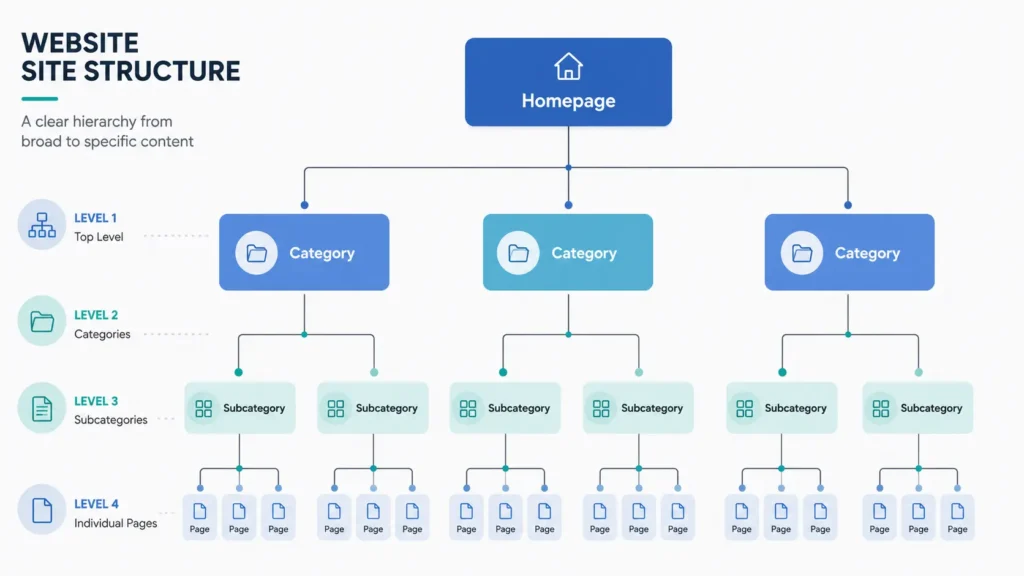
The key thing that makes this pyramid work is depth, or rather the lack of it. In a well-structured site, no page should be more than three or four clicks away from the homepage. If someone has to click through six or seven layers to reach a piece of content, that page is essentially buried, both for your visitors and for Google’s crawlers.
A few signs usually give away a healthy structure at a glance.
Your navigation menu reflects your most important categories, not a random assortment of pages someone added over the years. Your URLs follow the same logical hierarchy as your content, so a blog post about running shoes sits under /blog/running-shoes/ rather than floating around with no relation to anything else. Related pages link to each other naturally within the content itself, not just through a generic “related posts” widget at the bottom.
And maybe the clearest sign of all, a new visitor can land on any page of your site and figure out within a few seconds where they are and how to get to where they actually want to go.
Types of Website Structure
Not every site should be built the same way, and knowing which structure fits your goals makes a real difference before you start moving pages around. The right choice usually comes down to how much content you have and how tightly related that content is, so it helps to know what each approach actually looks like before picking one.
Flat structure
It keeps almost everything just one or two clicks from the homepage, with very little nesting in between. This works well for smaller sites, like a portfolio or a business with a handful of service pages, where there simply isn’t enough content to justify deep categories. The downside shows up once your site grows, because a flat structure with hundreds of pages quickly turns into a cluttered mess with no clear organization.
Hierarchical structure
It is the pyramid shape covered earlier, with a homepage branching into categories, then subcategories, then individual pages. This is the most common approach for content-heavy sites like blogs, ecommerce stores, and anything with more than a few dozen pages, because it scales well and keeps everything logically grouped as you add more content over time.
Silo structure
It takes the hierarchical idea a step further by tightly grouping related content together and limiting how much it links outside its own topic cluster. Picture separate towers of content, each fully dedicated to one subject, with strong internal linking within that tower and minimal crossover to unrelated topics. This approach is powerful for building topical authority, since it signals to Google that you have deep, focused expertise on specific subjects rather than scattered, general content.
Most sites end up using a mix in practice. The overall site tends to follow a hierarchical shape, while specific content areas (like a blog covering several distinct topics) get siloed within that broader hierarchy. That combination usually gives you the scalability of hierarchy with the topical strength of silos.
Key Elements of an SEO-Friendly Site Structure
Once you understand the shape your site should take, the next step is making sure the individual pieces inside that shape are actually pulling their weight. These are the elements that turn a decent structure into one that genuinely performs well for SEO.
Each of these elements works best when they’re built together rather than added one at a time as an afterthought. A clean URL hierarchy means little if your internal linking is scattered, and a great navigation menu can’t make up for pages buried six clicks deep. When these pieces align, your structure stops being just organized and starts actively working in your favor for rankings.
How to Create a Site Structure for SEO
This is usually the part people want to skip straight to, and I get it. But building a site structure that actually works isn’t something you rush through in an afternoon. It’s a process, and each step sets up the next one, so let’s walk through it properly.
Map Your Topics Before You Build Anything
Before you touch your website, sit down and map out every topic you plan to cover, ideally on a spreadsheet or a mind map rather than jumping straight into your CMS. Start broad, then get specific. If you run a fitness blog, your broad topics might be strength training, nutrition, and recovery, and each of those breaks down further into dozens of specific subtopics.
The goal here is to see your entire content universe laid out at once, before any of it exists as actual pages. This step matters because it’s much easier to spot natural groupings and hierarchy on paper than it is to reorganize fifty live pages after the fact. Most structural problems happen because people build content reactively, one page at a time, without ever stepping back to see the bigger picture.
Decide How Deep Your Hierarchy Should Go
Once you have your topics mapped, decide how many layers your structure actually needs. For most sites, three levels works well, meaning homepage, then category, then individual page. Larger sites with genuinely broad content might need a fourth level with subcategories in between.
The instinct is often to add more layers than necessary, especially if you’re trying to organize a huge amount of content. Resist that urge where you can. Every extra layer adds another click between your homepage and that content, and remember, depth is the enemy here. If a topic doesn’t have enough unique content to justify its own subcategory, it probably belongs as a page within a broader category instead.
Group Content Into Categories or Silos
With your topics mapped and your depth decided, start grouping individual topics into their categories. This is where you decide whether a hierarchical approach or a siloed approach fits your site better, based on what you learned about the differences earlier.
Be honest about natural relationships here rather than forcing content into categories just because it feels tidy. If two topics don’t genuinely relate to each other, don’t group them together just to reduce your category count. Google can tell when categorization feels arbitrary, and so can your visitors, and that undermines the whole point of building a clear structure in the first place.
Plan URLs and Navigation Together
The final step is making sure your URLs and your navigation menu both reflect the structure you just built, and that they reflect it consistently. Your URL for a page should mirror its place in the hierarchy, so something under your strength training category might live at /strength-training/beginner-guide/ rather than a flat, disconnected URL.
Your navigation menu should highlight your top-level categories clearly, without trying to cram every single subcategory into the main menu. Save deeper navigation for within-page links, sidebar menus, or breadcrumbs instead. When your URLs, navigation, and internal linking all point to the same underlying structure, that consistency is exactly what makes it easy for both Google and your visitors to understand your site.
How Site Structure Affects Internal Linking
Site structure and internal linking get talked about as if they’re two separate things, but honestly, they’re more like two sides of the same coin. Your structure is the skeleton, and internal linking is what actually brings that skeleton to life for both Google and your visitors.
Here’s the connection. Your hierarchy determines which pages should logically link to which. A category page should link down to its subcategories and individual posts, and those posts should link back up to the category they belong to, along with sideways to closely related articles within that same topic. When your structure is clear, these linking decisions become almost automatic, because the logical relationships between pages are already obvious.
This is also where authority actually moves around your site. Every internal link passes along a little bit of ranking value from one page to another, which is why your most important pages, the ones you actually want to rank, need to be well linked from other relevant pages rather than sitting off to the side with barely any links pointing to them. A brand new blog post buried deep in your structure with zero internal links pointing to it is going to struggle no matter how good the content is, simply because nothing is telling Google (or your visitors) that it exists or that it matters.
Structure also prevents one of the most common internal linking mistakes, which is linking everything to everything. Without a clear hierarchy guiding you, it’s tempting to just link every page to every other vaguely related page, hoping it helps. But that actually dilutes your linking strategy rather than strengthening it, because Google can’t tell what’s genuinely important when everything appears equally connected. A clear structure naturally limits and focuses your linking, because it tells you exactly which relationships between pages actually matter.
And there’s a compounding effect worth mentioning too. As you build out more content within a well-structured topic cluster, each new page adds more internal linking opportunities for the pages that came before it. Your oldest cornerstone content keeps getting stronger over time, not because you’re doing anything new to it, but because your structure keeps feeding it fresh internal links from everything you publish afterward.
Website Structure vs URL Structure
These two terms get mixed up constantly, and honestly, it makes sense why. They’re closely related and they work together, but they’re not actually the same thing, and understanding the difference matters more than you’d think.
Site structure is the big picture. It’s how your pages relate to each other, how your categories are organized, and how everything connects through navigation and internal links. URL structure, on the other hand, is much narrower. It’s specifically about how your web addresses are formatted, and whether those addresses reflect the hierarchy your site is built on.
The reason these two get confused so often is that a good URL structure is usually just a direct reflection of a good site structure. When your URLs mirror your hierarchy, like /nutrition/meal-planning/beginner-guide/, that’s your site structure showing up visibly in your URL structure.
But you can’t fix a broken site structure just by cleaning up your URLs. If your internal linking and navigation don’t actually reflect that hierarchy, tidy URLs are really just a nice looking coat of paint on a foundation that still needs work.
How to Audit Your Website Structure
Even a site that started out well organized can drift over time. New pages get added under whatever category feels closest at the moment, old content gets orphaned as priorities shift, and before long your once-clean structure needs a proper check-up. Here’s how to actually run that audit.
Start With a Full Crawl of Your Site
Before you can fix anything, you need to see everything. Tools like Screaming Frog or Sitebulb crawl your entire site the way Google does, giving you a complete list of every page, how deep it sits in your structure, and how many internal links point to it. This step matters because you genuinely cannot audit what you can’t see, and most people are surprised by how many forgotten pages show up once they run a full crawl.
Check Your Click Depth
Once you have your crawl data, look specifically at click depth for your important pages. Anything sitting five or six clicks from your homepage needs attention, especially if it’s a page you actually want to rank. Cross reference this against your top priority content and ask yourself honestly whether Google would even find these pages easily by following your internal links.
Look for Orphan Pages
Orphan pages are pages with no internal links pointing to them at all, meaning the only way anyone finds them is through a direct URL or a sitemap. These are usually the biggest wins in an audit because they’re often good content that’s simply invisible within your own site structure. Your crawl tool should flag these directly, so cross reference that list against pages you know exist but weren’t picked up organically through crawling.
Review Your Navigation and Categories
Step back and look at your navigation menu and category structure with fresh eyes, ideally as if you’d never seen the site before. Does the menu still reflect what your site is actually about, or has it become outdated as your content evolved? Are there categories with barely any content in them, or content that’s clearly misplaced in a category it doesn’t really belong to?
Audit Your Internal Linking Patterns
Look at how your pages actually link to each other, not just whether they do. Are your most important pages getting linked to from relevant, related content, or are they sitting isolated with only a homepage link pointing to them? This is also a good time to check whether your anchor text is descriptive and relevant, rather than generic phrases like “click here” that tell Google nothing about the linked page.
Compare Everything Against Your Original Plan
If you mapped out your topics and hierarchy when you first built your structure, pull that plan back out and compare it against what actually exists on your site today. Sites drift from their original plan constantly as new content gets added under time pressure, and this comparison usually reveals exactly where and how that drift happened.
Once you’ve worked through all of this, you’ll have a clear picture of what’s working, what’s broken, and where your priorities should be for cleaning things up.

Fixing Site Structure With Tsabit Insight
Site structure isn’t something you set once and forget either, it’s something that needs revisiting as your content grows and your business evolves. If you’ve made it this far through this guide, you already know there’s a lot of moving pieces to get right, from hierarchy and click depth down to internal linking and URL structure. The good news is, you don’t have to sort through all of it alone.
At Tsabit Insight, I provide freelance SEO services built around exactly this kind of process, auditing how your site is currently organized, identifying where pages are buried or orphaned, and rebuilding a structure that actually helps Google and your visitors find what matters. Every project starts with understanding your site and your goals, the same way this guide does, before any crawl tool or spreadsheet gets involved.
Whether you’re starting a new site from scratch or trying to untangle a structure that’s grown messy over the years, the approach stays grounded in what genuinely improves crawlability and rankings, not just what looks tidy on paper.
If you’re looking for a reliable freelance SEO specialist to fix your site structure and set it up to scale properly, contact me to discuss your project and discover how Tsabit Insight can help your business grow through a site that’s actually built to be found.
FAQ