Internal Linking: How to Turn Your Existing Content Into an SEO Strategy
Internal Linking is the part of an SEO strategy I see skipped the most, not because it’s hard, but because it’s invisible — nobody notices a missing link the way they notice a missing headline. Across the sites I’ve managed, I’ve watched pages sit stuck for months with solid content and reasonable rankings, only to move up several positions after nothing more than a handful of contextual links pointing to them from stronger pages on the same site.
What convinced me this matters as much as it does wasn’t a single case, it was the pattern: pages that got linked from three or four relevant articles consistently outperformed identical content that sat isolated with no links pointing in. No new content, no backlinks, no technical fix — just connections that were already sitting there, unused. That’s the gap this guide is built around: not what internal linking is in theory, but what it actually does once you start using it deliberately.
What Is Internal Linking?
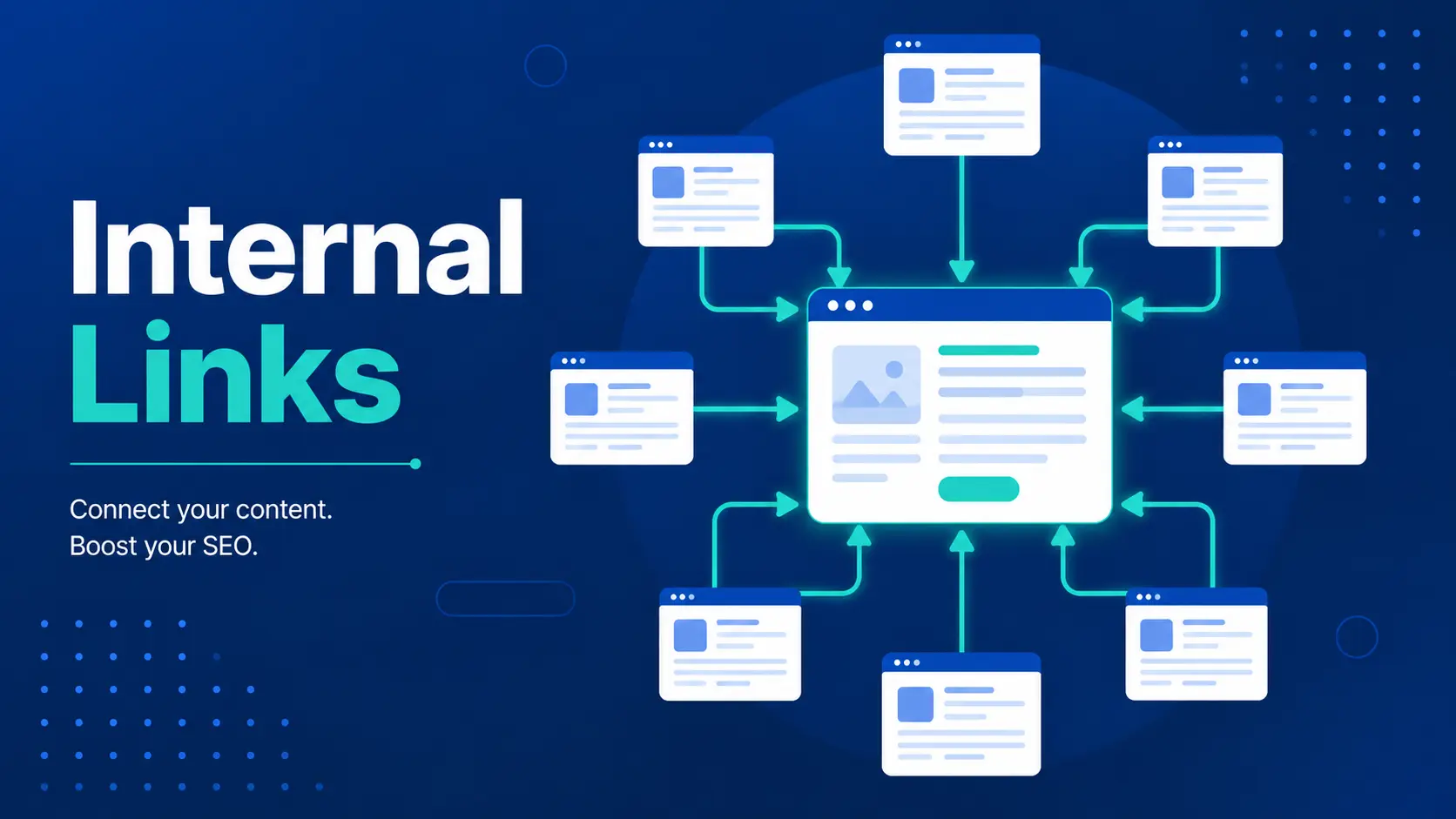
Internal linking is the practice of connecting one page on your website to another page on the same domain, usually through a hyperlink placed within the body content, navigation, or footer. Unlike external links, which point visitors (and search engines) to a different website entirely, internal links keep everything within your own site’s ecosystem.
I think of internal links as the roads connecting different parts of a city. A page can be well-built on its own, but if there’s no road leading to it, almost nobody finds it — and the ones who do have to work harder to get there. The sites where I’ve seen the strongest organic growth were rarely the ones with the most content. They were the ones where every page had a clear path pointing to and from it.
How Internal Links Work
When a search engine crawls your site, it follows internal links the same way a visitor would clicking through — link by link, page by page. Every link passes along a portion of the page’s authority (often called “link equity”) to the page it points to, and it also tells search engines what that destination page is about, based on the anchor text used.
This is the part people underestimate: a page with zero internal links pointing to it is much harder for Google to find, understand, or rank, even if the content itself is excellent. In practice, I’ve seen pages get indexed within days simply because they were linked from a high-traffic page, versus sitting unindexed for weeks when they were left as an isolated URL.
Internal Linking Examples
A few common examples of internal linking in action:
- A blog post linking to a related article (“For a deeper look at keyword research, see our guide on…”)
- A product page linking to a related product or category page
- A navigation menu linking to core service or landing pages
- A footer linking to legal pages, sitemaps, or cornerstone content
- Breadcrumb links showing a page’s position within the site hierarchy
The common thread across all of these is intent — each link exists to genuinely help a visitor go somewhere useful next, not just to hit a link-count quota on the page.
Read Also: What is On-Page SEO? How to do it
How Search Engines Use Internal Links
Search engines rely on internal links for two main jobs: discovery and context. When Googlebot crawls a page, it follows every internal link it finds to locate new or updated content — which means a page with no internal links pointing to it can go unnoticed for far longer than one that’s well-connected, even if it’s technically submitted through a sitemap.
The second job is context. The anchor text used in an internal link gives search engines a signal about what the destination page is about, almost like a mini description written by the rest of your site. Link “SEO audit checklist” to a page using that exact phrase repeatedly across your site, and you’re reinforcing what that page should rank for — far more naturally than stuffing the phrase into the page’s own copy.
There’s also a distribution effect worth understanding: link equity (a portion of a page’s authority) flows through internal links, which is why cornerstone or high-authority pages linking down to newer or weaker pages can genuinely help those pages gain traction faster than they would sitting on their own. It’s not a guarantee, but in the audits I’ve run, it’s one of the more consistent patterns I’ve seen hold up.
Internal Links vs External Links
Both are hyperlinks, but they serve different purposes and carry different weight in how search engines and visitors evaluate a page. Understanding the split helps clarify why a strategy needs both, not just one or the other.
The two aren’t competing strategies — a page with strong internal linking but zero external references can feel isolated from the wider web, while a page full of external citations but no internal links is difficult for both users and search engines to navigate to. The strongest content strategies I’ve worked with use both deliberately, not one at the expense of the other.
Why Internal Linking Is Important for SEO
Beyond the mechanics of crawling and link equity, internal linking directly shapes three things that matter to both search engines and real visitors: site structure, user experience, and page authority distribution.
A well-linked site gives search engines a clear map of what’s most important. Pages linked from many places across your site signal priority, while orphan pages — ones with no internal links pointing to them — often get treated as an afterthought, regardless of how strong the content is. I’ve seen this play out directly: two nearly identical articles, one linked from five other pages and one sitting isolated, and the linked version consistently outperformed the other in both indexing speed and ranking stability.
It also keeps visitors on your site longer. A reader who finishes an article and finds a relevant next link is far more likely to keep browsing than one who hits a dead end and bounces back to Google. That extra time on site, combined with lower bounce rates, is a pattern I’ve watched correlate with better overall page performance, even if it’s not a direct ranking factor on its own.
And finally, internal linking is one of the few SEO levers you have full control over. You can’t control who links to you externally, but you decide exactly which pages get linked, how often, and with what anchor text — which makes it one of the fastest, lowest-cost improvements available on any site.
Types of Internal Links
Not all internal links serve the same function, and mixing them intentionally is what makes a linking strategy actually work rather than just filling pages with random links. Here’s how the main types break down:
Contextual links tend to carry the most SEO weight since they’re placed deliberately within relevant content, but a strong strategy layers several of these types together — navigational links for structure, contextual for relevance, and CTA links for conversion, each doing a different job.
Benefits of a Strong Internal Linking Strategy
Once internal linking is treated as a deliberate strategy rather than an afterthought — something planned alongside content creation instead of bolted on after publishing — the payoff tends to show up in a few consistent, measurable ways. None of these require writing new content or earning a single backlink; they come almost entirely from making better use of what’s already sitting on your site.
- Faster indexing for new content
Pages linked from existing, well-crawled content get discovered by search engines much faster than pages left to rely on a sitemap alone. In my own experience, new articles linked from a high-traffic page have gone from published to indexed within days, versus weeks for isolated pages. - Better distribution of page authority
Instead of all your site’s ranking power concentrated on one or two pages, internal links spread that authority to newer or weaker pages, helping them gain traction faster than they would standing alone. - Improved user experience and lower bounce rates
Visitors who find a relevant next step tend to stay longer and explore more of the site, rather than bouncing back to the search results after one page. - Clearer site structure for both users and search engines
A logical linking pattern reinforces which pages matter most, helping search engines understand your site’s hierarchy and topical focus. - Higher conversion potential
Strategic internal links, especially CTA-style ones, guide visitors toward the pages that actually matter to your business — not just the ones they happened to land on first.
This is part of why I consider internal linking one of the highest-ROI fixes on almost any site I audit — it’s low-cost, fully within your control, and the results tend to show up faster than most other SEO efforts.
How to Build an Effective Internal Linking Strategy
Building this well isn’t about adding as many links as possible, and it’s not something you can bolt on at the end of a content calendar either — it’s a deliberate process that has to be built into how you plan, write, and maintain content from the start. Every time I’m structuring a new site or cleaning up an existing one, I run through the same handful of steps, and the order matters almost as much as the steps themselves, since skipping the early ones tends to make the later ones far less effective.
Start with a content audit
Before adding a single link, I map out everything that already exists on the site — which pages are pulling the most traffic and authority, which ones are sitting completely orphaned with no links pointing to them, and which topics are closely related but have never been connected to each other.
This step is tedious, and it’s the one most people skip in favour of just adding links as they go, but it’s also the step that determines whether everything that follows actually works or just adds noise to the site.
Identify your cornerstone content
Every site has a handful of pages that deserve to be treated differently from the rest — comprehensive guides, key service or product pages, or content that consistently converts. I treat these as hubs, deliberately building supporting articles and pages around them, and making sure every piece of related content links back to that hub in a natural, contextual way. Over time, this turns a handful of strong pages into anchors that carry the rest of the site.
Use descriptive and varied anchor text
Repeating the exact same anchor text every time you link to a page looks unnatural, both to a human reader scanning the sentence and to a search engine evaluating the pattern across your site. I vary the phrasing based on context, keeping it relevant to the destination page’s topic, so each link reads like a natural part of the sentence rather than an inserted keyword.
Link from high-authority pages to newer or weaker ones
This is where the authority-distribution benefit actually gets activated. A link placed on a page that already ranks well and receives consistent traffic passes far more value than the same link buried on a page nobody visits. When I’m planning where to add links, I actively look for my strongest-performing pages first and ask what newer or underperforming content they could realistically support.
Build linking into your content workflow, not as a separate task
The sites where I’ve seen the strongest, most consistent results are the ones that treat internal linking as part of the writing process itself, not a cleanup job scheduled for some future date. Every new article should launch with at least a few links pointing to related existing content, and just as importantly, existing content should get updated with a link pointing to the new piece — that second half is the part people forget most often.
How Many Internal Links Should a Page Have?
There’s no universal number, and I’d be sceptical of any guide that hands you one without context. What matters more is relevance — every link should have a genuine reason to exist for the reader, not just fill a quota to hit some arbitrary target.
That said, as a practical range, most well-structured articles I’ve worked on land somewhere between 3 and 10 internal links, depending on length and topic depth. A 2,000-word guide covering several subtopics naturally supports more links than a short 500-word update, and forcing extra links into shorter content usually does more harm than good.
The real test I use: if I removed a link, would the reader lose something useful? If the answer is no, it probably shouldn’t be there in the first place.
Common Internal Linking Mistakes
Most of the internal linking problems I find during site audits aren’t caused by a lack of effort — they’re caused by links being added without any real strategy behind them, which ends up doing more harm than having no links at all in some cases. These are the ones I run into most consistently.
- Leaving pages orphaned
A page with zero internal links pointing to it is one of the easiest issues to miss, since it’s invisible unless you’re actively auditing site structure. I’ve found entire cornerstone pages sitting orphaned simply because they were published before the linking strategy existed, and nobody circled back. - Overusing exact-match anchor text
Linking the same keyword phrase word-for-word every single time isn’t just unnatural to read, it can also look manipulative to search engines when the pattern repeats across dozens of pages. Varying the anchor text while keeping it relevant solves this without losing the SEO value. - Linking for the sake of hitting a quota
Some content guidelines push writers to add a fixed number of internal links per article, which leads to forced, irrelevant links that add no value to the reader. I’d rather see three genuinely useful links than ten padded ones. - Broken or outdated internal links
Pages get deleted, URLs change, and slugs get updated — and internal links pointing to old versions quietly break in the background. This is one of the most common issues I catch in audits, and it’s often been sitting unnoticed for months. - Linking only from new content, never updating old content
Publishing a new article with links out to older pages is only half the job. The other half — going back and adding a link from relevant older content into the new piece — is the step almost everyone forgets, and it’s often more valuable since older pages tend to carry more established authority. - Ignoring link placement within the page
A link buried in the last paragraph nobody scrolls to gets far fewer clicks than one placed naturally within the first few paragraphs. Where a link sits on the page matters almost as much as whether it exists at all.
How to Audit Internal Links
Auditing internal links is the step that usually reveals how much strategy (or lack of it) has actually gone into a site over time, and it’s one of the first things I run whenever I take on a new project — before writing a single new article, I need to understand what’s already broken, missing, or disconnected. Here’s the process I actually follow, step by step.
Crawl the entire site with a tool built for it
I start with a full site crawl using a tool like Screaming Frog, which maps every internal link on the site and flags issues automatically — broken links, redirect chains, orphaned pages, and pages with unusually few or unusually many internal links pointing to them. Doing this manually on any site beyond a handful of pages simply isn’t realistic, so this step is non-negotiable regardless of site size.
Identify orphaned pages
Once the crawl is done, I specifically filter for pages with zero internal links pointing to them. These are often older pages, forgotten landing pages, or content published before a linking strategy existed. I’ve found genuinely strong content sitting orphaned for over a year simply because nobody circled back to connect it to anything else on the site.
Check for broken or redirected internal links
Links pointing to deleted pages, changed URLs, or old slugs quietly waste crawl budget and pass zero value once they hit a 404 or an unnecessary redirect chain. I fix these by updating the link directly to the correct destination rather than relying on a redirect to patch it, since every redirect hop slightly weakens the signal being passed.
Review anchor text patterns
I look across the site for repeated exact-match anchor text pointing to the same page, which can look unnatural at scale, and for vague anchor text like “click here” or “read more” that wastes the opportunity to signal relevance. This is usually a quick fix once identified, but it requires actually reading through the crawl data rather than skimming it.
Evaluate link distribution against page priority
This is the step that separates a basic audit from a strategic one. I compare which pages are receiving the most internal links against which pages I actually want to rank or convert. It’s common to find a site where a low-priority blog post has 40 internal links while a core service page has three — that mismatch is usually the single biggest opportunity uncovered in any audit I run.
Set a recurring schedule, not a one-time check
Since content changes constantly, I treat this as a quarterly task rather than something done once and forgotten. New content, removed pages, and shifting business priorities all change what the “ideal” link structure should look like, so revisiting it regularly keeps the site’s link equity flowing to where it actually matters right now.

Strengthen Your Internal Linking with Tsabit Insight
Internal linking isn’t something you set up once and forget — it’s a living part of your site’s SEO health, one that needs revisiting every time you publish new content or restructure old pages. If you’ve made it this far through the guide, you already know there’s a lot of moving pieces to manage well, from anchor text to authority distribution to catching orphaned pages before they quietly hold your best content back.
The good news is, you don’t have to manage all of it alone. At Tsabit Insight, I provide freelance SEO Expert services built around exactly this kind of process — auditing your site’s link structure, mapping the right pages to each other, and turning a scattered content library into one that actually supports itself. Every project starts with understanding your goals and how your site is currently structured, the same way this guide does, before any crawl tool or spreadsheet gets involved.
Whether you’re starting from scratch or trying to fix a linking strategy that’s stalled, the approach stays grounded in what genuinely drives results — not just what looks clean in an audit report. If you’re looking for a reliable freelance SEO specialist to guide your internal linking strategy in the right direction, get in touch to discuss your project and discover how Tsabit Insight can help your business grow through smarter, more connected search visibility.
FAQ