What Are Meta Descriptions and How to Write Ones That Actually Get Clicked
Meta Descriptions used to be the field I filled in last, right before hitting publish — until I started noticing a pattern in Search Console I couldn’t ignore. Over the past two years, I’ve optimised more than 250 articles and watched some of them land featured snippets across three different countries, not because the content alone was strong, but because what showed up under the blue link in Google actually earned the click.
I’ve also seen the opposite: solid articles buried on page two of the SERP, not from a ranking issue, but because the description either got ignored, truncated, or rewritten entirely by Google. That gap between “technically correct” and “actually converts” is where most of my work lives now, managing SEO for multiple brand websites at once, and it’s exactly what this guide is built around.
What Is a Meta Description?
A meta description is the short snippet of HTML text — usually under 160 characters — that summarises a page’s content and shows up below the title tag in search results. It lives in the page’s <head> section as <meta name="description" content="...">, invisible to visitors on the page itself, but front and centre the moment that page shows up on Google.
I think of it less as a technical tag and more as the pitch line for your content. In my own work optimising hundreds of articles, the pages that consistently pulled ahead weren’t always the best-written ones — they were the ones whose description told a searcher, in one sentence, exactly why this result solved their problem better than the nine others on the page. A meta description doesn’t rank your page. It sells the click once the ranking is already there.
Where Does a Meta Description Appear?
The most obvious spot is the organic search result itself — that grey line of text sitting under your title tag and URL on Google. But it doesn’t stop there. Share a link on Facebook, LinkedIn, or in a Slack message, and that same description often gets pulled in as the preview text (assuming there’s no separate Open Graph description set). It can also surface when your page shows up in a Google Discover feed, and on some sites, in internal search or content-recommendation widgets.
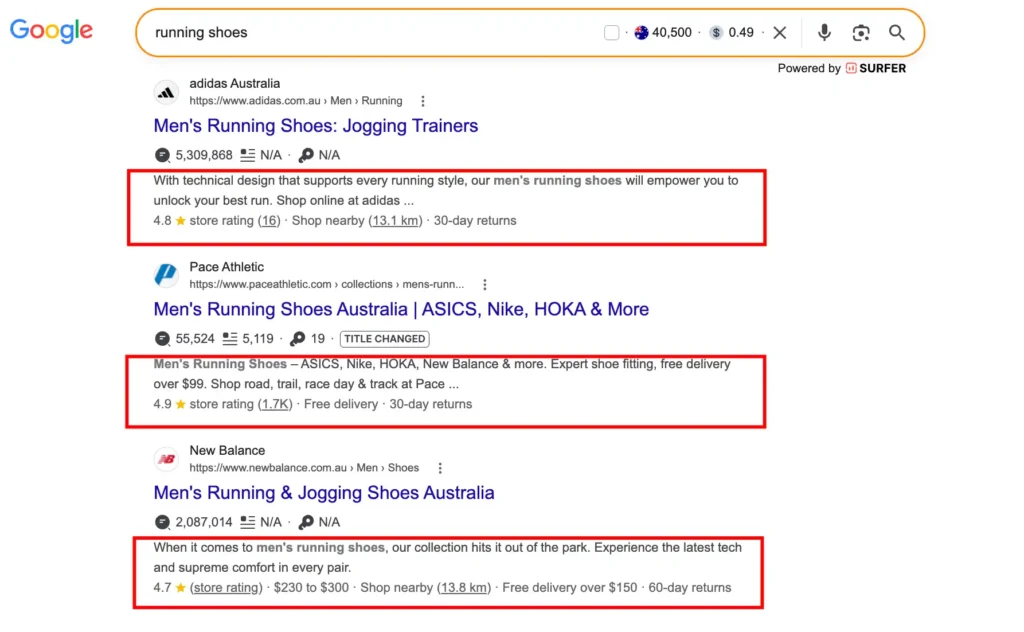
What I’ve learned managing this across multiple sites is that people treat it as an SEO-only field and forget it’s doing double duty as social proof. I’ve seen articles get shared dozens of times purely because the description made the topic sound urgent or useful — the ranking never changed, but the traffic from social did.
How Long Should a Meta Description Be?
There’s no hard character limit Google enforces, but in practice, aim for roughly 150–160 characters on desktop and slightly shorter for mobile, since Google truncates anything that runs past the pixel width it allots — not the character count. Go over, and you’ll see the dreaded “…” cut right through your call to action.
In my own experience, the sweet spot isn’t a number, it’s a shape: front-load the value in the first 120 characters so even a truncated version still makes sense on its own. I’ve tested descriptions that were “technically” too long, and Google simply rewrote them — which cost me the exact phrasing I wanted searchers to see. Since then, I treat 155 characters as a hard ceiling, not a guideline.
Does Meta Description Affect SEO?
Not directly. Google has confirmed this outright: Google says that even though it sometimes uses the description meta tag for the snippets it shows, it still doesn’t use the description meta tag in its ranking (Google Search Central Blog). John Mueller has reaffirmed the same position since, most recently in 2022. So it’s not a ranking factor — but that’s not the same as saying it doesn’t affect SEO outcomes.
Click-through rate is where the real impact lives. A page sitting in position 4 with a description that makes people stop scrolling can pull more clicks than the page above it in position 2. And while CTR alone isn’t confirmed as a direct ranking signal either, more clicks mean more traffic, more engagement signals, and more chances to convert — which is the metric that actually matters to a business.
In the sites I’ve managed, the pages that got a meta description rewrite almost always saw a traffic bump within a week or two, even when their ranking position didn’t move at all. So no, it won’t get you to page one. But it decides how much of page one’s traffic actually becomes yours.
Meta Description vs. Meta Keywords vs. Title Tag
These three live in the same neighbourhood of a page’s <head>, and I still see people mix them up constantly — sometimes writing a meta description as if it were a keyword dump, or treating the title tag and description as interchangeable when they serve completely different jobs.
Each one has its own weight in how a page performs, and understanding where they overlap and where they don’t makes it a lot easier to prioritise your time. Here’s how they actually stack up against each other:
If I had to rank them by how much attention they deserve today: title tag first, meta description second, meta keywords tag basically retired.
How to Write an Effective Meta Description
This is the section where most guides get generic, throwing out a checklist without explaining why any of it actually matters, so I want to walk through it the way I actually approach it every time I sit down to write one — the reasoning behind each choice, not just the rule itself.
Include the Focus Keyword Naturally
Google bolds the keyword when it matches the search query, and that bolding draws the eye before anyone reads a single word around it, which makes keyword placement one of the few things in this tag that still has a measurable visual effect on click behaviour. I always place the focus keyword early in the sentence, but never at the cost of it reading like it was stuffed in. If it sounds like a robot wrote it, rewrite it.
Match Search Intent
Before I write a single word, I ask what the person searching actually wants — an answer, a comparison, a product, a how-to — because the entire tone and structure of the description should shift depending on what stage of the buying or research journey that searcher is in. A description written for informational intent (“Learn how…”) reads completely differently from one written for transactional intent (“Shop…”, “Get a quote”). Mismatch the two, and you’ll get clicks that bounce immediately, which hurts more than no click at all.
Write for the Click, Not Just the Crawl
This is the mindset shift that changed my results the most, and it took me longer than I’d like to admit to actually internalise it. I stopped writing descriptions to please an algorithm and started writing them like ad copy — a real reason to choose this result over the nine others sitting on the same page. A number, a specific outcome, or a direct answer to the query does more work than a vague summary ever will.
Use Active Voice and a Clear Value Prop
“Learn,” “discover,” “get,” “compare” — action verbs create momentum, and that momentum is often the difference between a description that gets skimmed past and one that actually gets read to the end. Passive descriptions (“This article is about…”) waste characters saying nothing. I try to answer one question in every description I write: what does the reader walk away with?
Avoid Duplicate Descriptions Across Pages
When I’ve audited larger sites, this is the mistake I catch most often, and it’s rarely intentional — it usually happens because descriptions get copy-pasted as placeholders and nobody circles back to customise them. Dozens of pages end up sharing the same generic line, or worse, none at all. Google will write its own if yours is missing or duplicated, and you lose control of your own pitch. Every page deserves one unique sentence that earns its own click.
Also Read: What is On-Page SEO? How to do it
Why Google Sometimes Rewrites Meta Descriptions
Even a well-written meta description doesn’t guarantee Google will use it. Studies and my own observations across dozens of pages suggest Google rewrites the meta description more often than it keeps it as-is — sometimes pulling a different sentence straight from the page body instead.
Here’s what usually triggers a rewrite:
- The description doesn’t match the search query
If someone searches a specific long-tail phrase and your description doesn’t address it, Google will often pull a snippet from your content that answers the query more directly than your own tag does. - The description is too generic or too short
A vague summary gives Google little reason to trust it over the actual page content, especially if there’s a more specific sentence sitting in your first paragraph. - The description is missing or duplicated across pages
No description, or the same one repeated site-wide, tells Google there’s nothing reliable to pull from, so it defaults to generating one. - The page targets multiple search intents
One static description can’t serve every possible query a page might rank for, so Google dynamically swaps in different text depending on what was searched.
What I’ve learned from watching this happen repeatedly is that a rewrite isn’t a failure — it’s Google telling you the on-page content matched intent better than the tag did. The fix isn’t to fight it harder, it’s to write your description as if it’s a summary of your best-matching paragraph, so whichever version shows up still serves the click.
Meta Description Examples
Reading advice is one thing, seeing it applied against real page types is another, and this is usually the part people skip straight to anyway. So instead of just describing what a “good” meta description looks like in the abstract, here’s a direct meta description sample comparison — a weak version most sites still ship with, and a rewritten version that applies everything covered earlier: specificity, active voice, and a clear reason to click.
The pattern across every “effective” version is the same: a specific detail (a number, a benefit, a location) replacing a vague claim. That’s usually the only real difference between a description that gets skipped and one that gets clicked.
How to Add a Meta Description by CMS/Framework
Where you set a meta description changes depending on the platform, and I’ve worked across enough of them to know the interface rarely matches the documentation exactly. Here’s how it looks in practice across the platforms most people actually use.
WordPress (Yoast/RankMath)
Both plugins add a Snippet Preview box directly under the content editor, showing a live simulation of how your title and description will look in Google search results as you type. You fill in the “Meta description” field, and the character counter turns red once you cross the safe limit — a small detail that’s saved me from truncated descriptions more times than I can count.
Shopify
Shopify handles this under Search Engine Listing Preview, found in the “Edit website SEO” section of a product, page, or blog post. Unlike WordPress, there’s no live snippet preview as you type — you write it, save, and it’s what search engines will pull, so double-checking length before publishing matters more here.
Wix
Wix keeps this under the SEO Basics / SEO Settings panel for each page, sometimes with an SEO wizard that auto-suggests a description based on your content. I’d treat the auto-suggestion as a first draft, not a final answer — it’s rarely as sharp as one written with actual search intent in mind.
Webflow
Webflow places it under Page Settings → SEO, with separate fields for the meta description and, notably, the Open Graph description used for social shares. This is one of the few platforms that makes the split between search and social snippets explicit from the start.
Custom HTML / Static Sites
No panel here — it’s a direct line in the <head>: <meta name="description" content="your text here">. This is the version I’d recommend understanding first, even if you never touch raw HTML day-to-day, because every CMS above is really just a friendlier interface wrapped around this.
Common Meta Description Mistakes
Most of these aren’t complicated to fix, and none of them require any special tool or technical skill — they just slip through because meta descriptions get treated as an afterthought instead of actual copywriting, something to fill in quickly rather than something worth the same care as a headline.
Having audited a fair number of sites at this point, I keep running into the same handful of issues over and over, which tells me they’re less about individual mistakes and more about how meta descriptions get deprioritised in most content workflows. Here are the ones I see most often, including a few I used to make myself early on.
- Writing it after publishing, as a checkbox task
When it’s the last field filled in before hitting publish, it shows. A rushed description reads generic because it usually is. - Keyword stuffing
Repeating the focus keyword two or three times doesn’t help — Google only bolds it once per instance anyway, and it makes the sentence read unnatural to an actual human deciding whether to click. - Letting it run too long and get truncated mid-sentence
A description cut off at “…how to improve your web” instead of “…how to improve your website speed” kills the exact point you were building toward. - Duplicating the same description across multiple pages
I covered this earlier, but it’s worth repeating here because it’s consistently the most common issue I find in site audits — templates and bulk imports are usually the culprit. - Making promises the page doesn’t deliver on
A description that oversells (“The ultimate guide to…”) only to lead to a thin 300-word page increases bounce rate fast, and that mismatch between promise and content is one of the quickest ways to lose trust with a returning searcher. - Ignoring mobile truncation
Descriptions that look fine on desktop often get cut earlier on mobile, where the majority of search traffic actually happens. I always preview both before finalising.
Meta Description Myths
Meta descriptions have been around long enough to collect a fair share of outdated advice, and some of it still gets repeated in guides that haven’t been updated in years. Here’s what I’ve found to actually be true versus what people still assume, often based on habits carried over from a much earlier version of SEO.
- Myth: Meta descriptions directly boost rankings
Google has stated plainly that the description tag isn’t used in ranking. What it influences is click-through rate, which is a different (and indirect) mechanism entirely — conflating the two is where most of this confusion starts. - Myth: Google always uses what you write
Not even close. Google rewrites meta descriptions a significant portion of the time when it decides a snippet from the page content better matches the search query, no matter how well-crafted your original version is. - Myth: Longer descriptions perform better
Length doesn’t equal persuasion. A tight, specific 140-character description that answers the query directly will usually outperform a padded 300-character one that gets truncated anyway. - Myth: One description works for every keyword a page ranks for
Pages often rank for dozens of different queries, and Google will swap in different text depending on intent. Writing one static description doesn’t account for that variability — it just optimises for your best guess. - Myth: Meta descriptions don’t matter anymore because Google rewrites them so often
This is the one I disagree with most. Even if Google overrides it half the time, the other half is still yours to control — and on the pages where it holds, it’s often the deciding factor in whether someone clicks at all.

Perfecting Meta Descriptions with Tsabit Insight
A meta description isn’t something you write once and forget — it’s a small piece of copy that deserves the same attention as the headline it sits under, and one that’s worth revisiting as your content ages and your competition changes. If you’ve made it this far through the guide, you already know there’s more nuance here than a single-sentence summary of a page. The good news is, you don’t have to get it right alone.
At Tsabit Insight, I provide freelance SEO services built around exactly this kind of process — auditing existing descriptions, rewriting them to match real search intent, and making sure every page earns the click it’s already ranking for. Every project starts with understanding your goals and audience, the same way this guide does, before any tool or template gets involved. Whether you’re starting from scratch or trying to fix pages that Google keeps rewriting, the approach stays grounded in what genuinely drives clicks and conversions — not just what looks good in an audit report.
If you’re looking for a reliable freelance SEO specialist to sharpen your on-page details and turn them into real traffic, get in touch to discuss your project and discover how Tsabit Insight can help your business grow through smarter, more targeted search visibility.
FAQ