Understanding Structured Data and Learning to Speak Google’s Language
Structured Data sounds like something only developers should care about, but if you run a website and want Google to actually understand what you’re offering, this is one of the most important things you’ll ever learn.
I remember the first time I added a simple markup to a client’s product page and watched star ratings show up in the search results within days. That moment changed how I look at SEO entirely. So let’s walk through this together, piece by piece, in a way that actually makes sense.
What Is Structured Data in SEO?
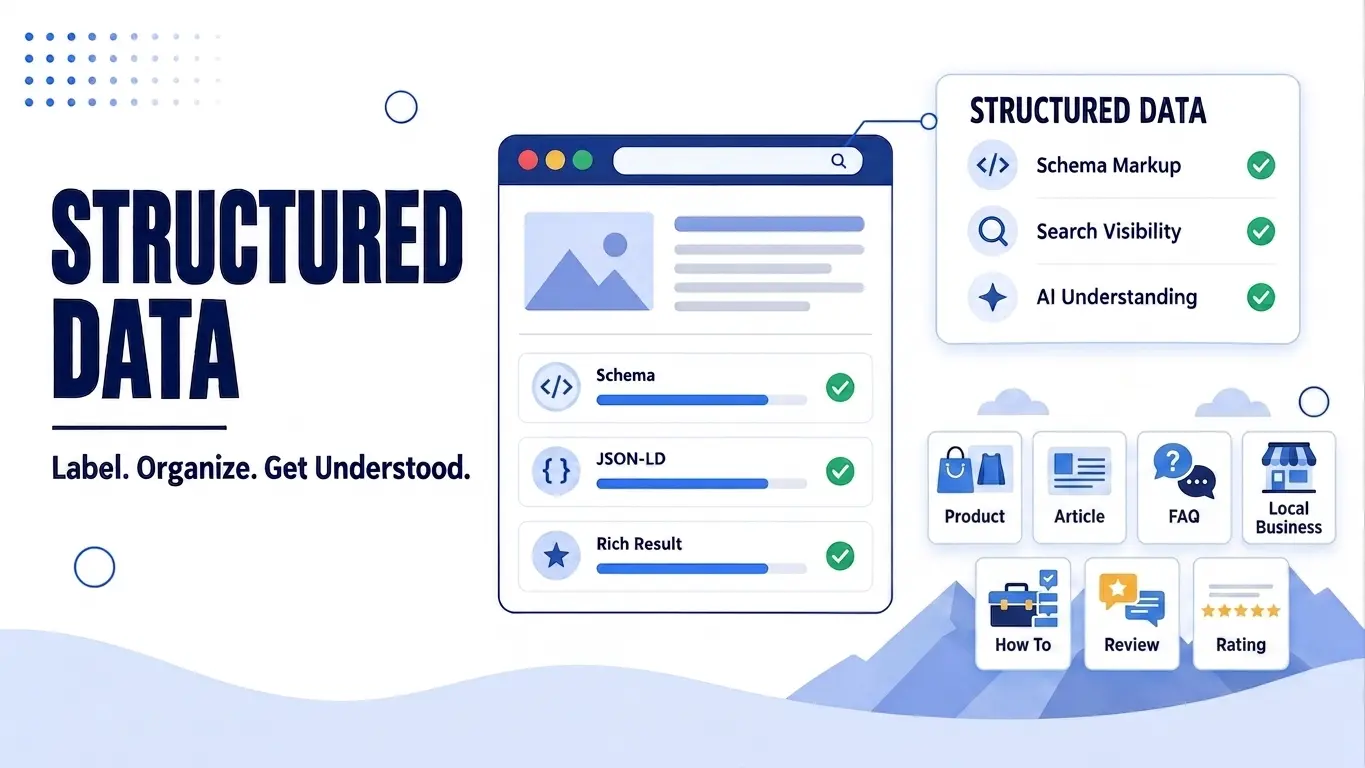
Structured Data is a standardized way of labeling your website’s content so search engines can read it with precision instead of guessing. It works like a translator sitting quietly behind your page, converting your words into a format machines can actually process.
Structured Data gives search engines clear, machine-readable context about what a piece of content actually represents, whether that’s a recipe, a product, a review, or an event. Without it, Google has to infer meaning from plain text, and that inference is never as reliable as an explicit label. This is why two pages with nearly identical content can perform very differently in search results.
One page speaks Google’s language fluently, while the other leaves everything open to interpretation. The clearer your Structured Data, the more accurately Google can represent your content to the people searching for it. That accuracy is the entire foundation of everything else we’re going to cover in this article.
Why Is Structured Data Important for SEO?
Structured Data matters because it directly influences how your content shows up in front of the people searching for it. It’s not just a technical nice to have, it’s often the difference between a plain listing and one that actually pulls the eye. Here are the main reasons it deserves a spot in your SEO strategy.
- It Unlocks Rich Results
Structured Data allows Google to display extra visual elements like star ratings, prices, or FAQ dropdowns directly in the search results, making your listing stand out from the rest. - It Improves Click Through Rates
When your listing looks more informative and visually appealing, people are naturally more likely to click on it instead of scrolling past to a plain text result. - It Helps Search Engines Understand Context Faster
Instead of relying on Google to interpret your content the hard way, Structured Data hands over the meaning directly, which speeds up how quickly and accurately your page gets indexed and understood. - It Supports Voice Search and Featured Snippets
Voice assistants and featured snippets pull answers from content that’s clearly labeled, so having Structured Data in place increases your chances of being the source they choose. - It Prepares Your Content for AI-Driven Search
As AI Overviews and other AI-powered search tools become more common, they rely heavily on clearly labeled data to summarize and cite sources accurately, so Structured Data becomes even more valuable moving forward.
Once your content is properly labeled, Google isn’t just crawling your page anymore, it’s actually understanding it. And that understanding is what opens the door to better visibility across both traditional search and the new wave of AI-powered results.
How Does Structured Data Work?
Structured Data works by attaching a hidden layer of code to your webpage that explains what the visible content actually means. You still write your article or product description the same way you always have, but behind the scenes, a snippet of code tells search engines exactly how to interpret it.
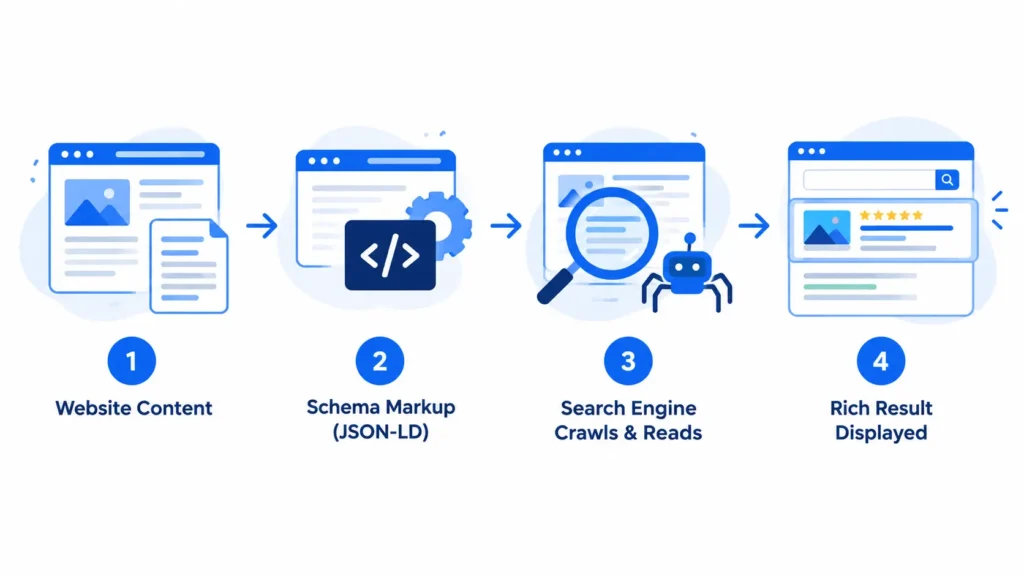
This code follows a shared vocabulary called Schema.org, which acts as a universal dictionary that both you and Google agree on. When a search engine crawls your page, it reads this markup alongside your regular content and matches it against that shared vocabulary to understand the relationships between different pieces of information. For example, it learns that a certain number is a price, that another piece of text is an author’s name, and that a five star rating belongs to a specific product rather than just floating randomly on the page.
Once Google successfully parses this markup, it becomes eligible to turn your listing into a rich result, complete with visual elements that plain text listings simply can’t achieve. It’s worth noting that adding Structured Data doesn’t guarantee a rich result will appear, but it does meet the technical requirement Google needs before it can even consider showing one. Think of it as handing Google a cheat sheet, it still decides how to use that information, but you’ve made its job significantly easier.
Also Read: The Complete Guide to Technical SEO And Why Your Content Isn’t Ranking Without It
Types of Structured Data for SEO
Structured Data isn’t a single type of markup, it’s actually a whole family of schemas, each designed for a specific kind of content. Choosing the right one depends entirely on what your page is actually about. Let’s go through the ones that matter most for everyday SEO work.
Article Schema
Article Schema is built for blog posts, news pieces, and any long form written content. It tells Google details like the headline, the author, the publish date, and the featured image, which helps your content show up properly in Google News, Discover feeds, and article carousels.
If you’re running a content heavy site like a blog, this is often the very first schema you should implement because it applies to almost every post you publish. Without it, Google still reads your article, but it misses out on the extra context that makes your content eligible for those enhanced placements.
Product Schema
Product Schema is essential for anything you’re selling online. It communicates the product name, price, availability, and often the brand, allowing Google to display these details directly in the search results before someone even clicks through.
This is the schema responsible for those listings you see with a price tag and an in stock label sitting right under the title. For ecommerce sites, this single schema type can noticeably improve click through rates because shoppers can compare price and availability at a glance without opening multiple tabs.
FAQ Schema
FAQ Schema takes a list of questions and answers on your page and makes them eligible to appear as an expandable dropdown directly in the search results. This is incredibly powerful for capturing more real estate on the results page, since your single listing can suddenly take up significantly more vertical space than a competitor’s plain link. It also works beautifully for voice search, since assistants often pull answers directly from FAQ marked content when responding to spoken queries.
How To Schema
How To Schema is designed for step by step guides and tutorials. It breaks down your content into numbered steps, sometimes complete with images and estimated time, and can generate a rich result that walks users through the process right inside the search results. This is particularly effective for DIY content, cooking instructions, or technical walkthroughs where the process itself is the main value of the page.
Review and Rating Schema
Review and Rating Schema is what generates those star ratings you often see under a product or business listing. It aggregates review scores and displays them prominently, which builds instant trust before a user even lands on your site. It’s worth noting that Google has become stricter about how this schema is used, so the ratings displayed must genuinely reflect real reviews collected on your site rather than being fabricated or pulled from unrelated sources.
Local Business Schema
Local Business Schema is critical for any brand with a physical location or a defined service area. It communicates your business name, address, phone number, operating hours, and even accepted payment methods, all of which feed directly into how you appear in Google Maps and local pack results. If local visibility matters to your business at all, this schema works hand in hand with your Google Business Profile to reinforce consistency across platforms.
Breadcrumb Schema
Breadcrumb Schema displays your site’s navigation path directly in the search result, showing users exactly where a page sits within your site structure before they even click. Beyond the visual benefit, it also helps search engines understand your site’s hierarchy more clearly, which can support better crawling and indexing of your internal pages over time.
Each of these schema types serves a different purpose, but they’re not mutually exclusive. Many pages benefit from combining several types at once, for example a product page might use both Product Schema and Review Schema together to maximize its chances of a rich result.
Also Read: Website Structure Is What Separates Sites That Rank From Sites That Don’t
Structured Data vs Schema Markup vs Schema.org
These three terms get thrown around interchangeably all the time, and honestly, that mix up causes more confusion than it should. They’re closely related, but they’re not the same thing, and understanding the difference actually makes the rest of this topic click into place much faster.
Think of it this way, Structured Data is the idea, Schema Markup is the tool you use to bring that idea to life, and Schema.org is the dictionary that makes sure everyone, both you and Google, agrees on what each label actually means.
Without Schema.org’s shared vocabulary, every website could invent its own labels, and Google would have no consistent way to interpret any of it. This is exactly why Schema.org exists as a collaborative project backed by Google, Microsoft, Yahoo, and Yandex, so that structured labeling works the same way across the entire web rather than being reinvented site by site.
Does Structured Data Improve Google Rankings?
This is one of the most common questions people ask once they start learning about Structured Data, and the honest answer is a bit more nuanced than a simple yes or no. Google has stated directly that Structured Data is not a direct ranking factor, a point confirmed in Google’s own structured data guidelines, meaning adding it to your page won’t automatically push you higher in the search results the way improving your content quality or building strong backlinks might.
If you’re expecting Structured Data alone to boost your rankings overnight, that expectation needs to be reset early on. That said, the story doesn’t end there, because Structured Data influences several things that indirectly affect how well your page performs. When your listing appears as a rich result with star ratings, images, or an FAQ dropdown, it naturally attracts more clicks than a plain text listing sitting right next to it.
A higher click through rate signals to Google that people find your result relevant and appealing, which can support better visibility over time even though the schema itself isn’t the direct cause. Structured Data also helps Google understand your content more accurately, and content that’s clearly understood tends to get matched with the right search queries more consistently.
In practice, Structured Data acts as an amplifier for good content rather than a replacement for it, it won’t rescue a weak page, but it can meaningfully strengthen a page that already deserves to rank well. So the real answer is that Structured Data doesn’t move the needle directly, but it creates the conditions that make ranking well more achievable.
Which Structured Data Should You Use?
With so many schema types available, this is usually where people start feeling a bit overwhelmed. The good news is that choosing the right one isn’t complicated once you stop thinking about it as a technical decision and start thinking about it as a content decision. The schema you need should always match what your page is actually offering, not what looks impressive on paper.
A simple way to approach this is by asking yourself one question first, what is this page fundamentally about? From there, the choice usually narrows down fast.
- If your page is a blog post or news piece, Article Schema is your starting point.
- If you’re selling something, Product Schema paired with Review Schema gives you the most visual impact.
- If your page answers common questions, FAQ Schema helps you claim extra space in the results.
- If you’re walking someone through a process, How To Schema turns your steps into an interactive result.
- If you run a physical or local service, Local Business Schema should be non-negotiable.
Don’t Stack Schema Just Because You Can
One mistake I see often is people adding every schema type they can find, hoping it improves their chances somehow. Google is fairly strict about this, and marking up content with a schema type that doesn’t genuinely match what’s on the page can actually hurt your eligibility for rich results rather than help it. If your page isn’t a recipe, don’t force Recipe Schema onto it just because it looks appealing in search.
When In Doubt, Check Google’s Own List
Google maintains an official list of supported structured data types, and if a schema isn’t on that list, it won’t generate a rich result no matter how correctly you implement it. This list is worth bookmarking, especially as Google occasionally adds or retires supported types over time.
At the end of the day, the right Structured Data isn’t the one that sounds the most advanced, it’s the one that honestly reflects what your content already is.
Structured Data Formats
Once you know which schema type fits your content, the next decision is how you actually write it into your page. There are three accepted formats, but they’re definitely not created equal in terms of ease and adoption.
JSON-LD
JSON-LD is Google’s clearly preferred format, and honestly, it’s the one I recommend to almost everyone I work with. It lives as a separate block of code, usually placed in the head section of your page, completely detached from your visible HTML.
This separation is exactly what makes it so practical, you can update or troubleshoot your Structured Data without touching your actual content or design. Most modern SEO plugins, including the ones built for WordPress, generate JSON-LD automatically, which is part of why it’s become the industry standard.
Microdata
Microdata takes a different approach entirely, it gets embedded directly inside your existing HTML tags using special attributes like itemscope and itemprop. While it works perfectly fine, it tends to make your HTML noticeably harder to read and maintain, especially on pages with complex layouts. If a developer isn’t careful, a small HTML change down the line can accidentally break the Microdata sitting inside it, which is a risk JSON-LD simply doesn’t carry.
RDFa
RDFa is the least commonly used of the three, though it still holds relevance in certain publishing and content heavy platforms, particularly those with strong ties to the Semantic Web community. Like Microdata, it’s woven directly into your HTML, but it uses a different attribute syntax built on top of standard HTML tags. Unless you’re working within a system that specifically requires it, there’s rarely a strong reason to choose RDFa over JSON-LD today.
If you’re starting from scratch, there’s really no reason to consider anything other than JSON-LD. It’s cleaner, it’s what Google actively recommends, and it keeps your Structured Data completely separate from the content your visitors actually see.
How to Add Structured Data to a Website
Knowing which schema to use is only half the equation, the other half is actually getting it onto your page correctly. There are a few different paths here, and the right one for you really depends on your comfort level with code and the platform your site runs on.
Manual Implementation with JSON-LD
This is the most direct route, and it gives you complete control over exactly what gets marked up. You write a small block of JSON-LD code that describes your content, then place it inside the head section of your HTML, or right before the closing body tag if your platform doesn’t give you easy access to the head. The code itself follows a simple key and value structure, where each key represents a property like name, author, or datePublished, and each value fills in the actual detail for your page.
The upside of going manual is precision, you control every single field without relying on a plugin’s assumptions about your content. The downside is that it requires some comfort with code, and any small syntax error, like a missing comma or bracket, can prevent the entire markup from working properly.
Using WordPress Plugins
For most WordPress sites, this is genuinely the easiest and most reliable path. Plugins like Rank Math and Yoast SEO come with built in schema generators that walk you through filling out fields through a simple visual interface, then automatically convert your input into valid JSON-LD behind the scenes. Rank Math in particular offers a fairly generous free tier of schema types, covering Article, Product, FAQ, and How To schemas without needing a premium upgrade.
The real advantage here is consistency, since the plugin handles the technical formatting for you, which significantly reduces the chance of a small coding mistake breaking your markup. If you’re managing multiple pages or an entire content cluster, this approach also scales far better than writing manual code for every single page.
Using Google Tag Manager
This method sits somewhere between fully manual and fully plugin based, and it’s particularly useful if you want to add Structured Data without directly editing your website’s code or template files. Through Tag Manager, you create a custom HTML tag containing your JSON-LD script, then set a trigger to fire it on the specific pages where it should appear.
This approach is especially handy for people managing multiple websites through one Tag Manager account, or for cases where a developer isn’t easily available to make direct code changes. The tradeoff is that debugging can feel slightly more layered, since you’re troubleshooting through Tag Manager’s interface rather than looking directly at your page’s source code.
Whichever method you choose, the end goal stays the same, valid JSON-LD sitting on your page in a way Google can read without any confusion.
How to Test and Validate Structured Data
Adding Structured Data to your page is only half the job done, you still need to confirm Google can actually read it the way you intended. Skipping this step is one of the most common reasons rich results never show up, even when the schema looks correct at first glance.
Google’s Rich Results Test
Google’s Rich Results Test is the first stop for almost every SEO working with Structured Data, and for good reason. You simply paste in your page URL or the raw code itself, and the tool tells you exactly which schema types it detected, along with any errors or warnings that might be blocking eligibility for a rich result.
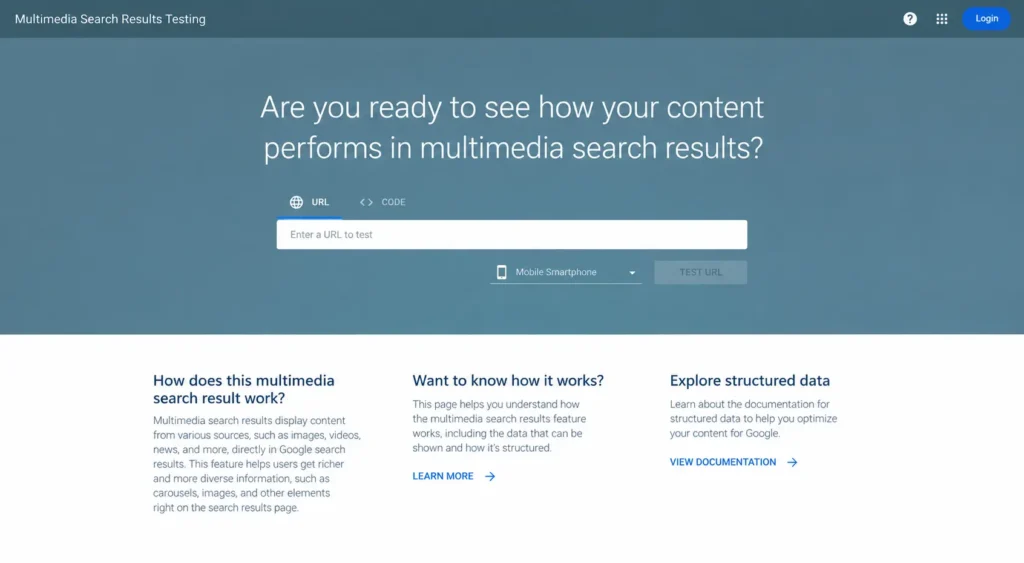
What makes this tool particularly useful is that it shows you a preview of how your rich result could actually look in search, giving you a realistic sense of the payoff before you commit fully to a schema type. If something’s broken, the tool usually points to the exact line or property causing the issue, which saves a lot of guesswork.
Schema Markup Validator
While the Rich Results Test focuses specifically on what Google can turn into a rich result, the Schema Markup Validator run by Schema.org checks your code against the full vocabulary itself, regardless of whether Google currently supports a rich result for that type.
This is especially useful when you’re implementing a less common schema type that Google doesn’t display as a rich result yet, since it confirms your markup is still technically valid according to Schema.org’s standards even if it won’t visually change your search listing today.
Monitoring via Google Search Console
Testing a single page is useful, but Search Console is where you catch problems at scale across your entire site. Inside the Enhancements section, Google groups your pages by schema type and flags any errors or warnings it found during indexing, often surfacing issues you’d never catch by testing pages one at a time.
This is also where you’ll see if a manual action has been applied for structured data misuse, which would strip a page’s eligibility for rich results without affecting its regular ranking. Checking this report regularly, especially after a site migration or a plugin update, helps you catch markup that quietly broke without any obvious warning sign on the page itself.
Testing isn’t a one time task either, it’s worth rechecking your Structured Data periodically, particularly after redesigns, plugin updates, or any changes to your page templates that could unintentionally disrupt the markup sitting behind the scenes.
Structured Data and AI Search
Search is going through one of its biggest shifts in years, and naturally, everyone wants to know where Structured Data fits into that shift. The common assumption is that clearly labeled content automatically earns more citations from AI Overviews and chatbots, but the real picture turns out to be more nuanced than that.
A large scale study from Ahrefs tracking nearly 1,900 pages that added JSON-LD found no meaningful citation increase across Google AI Overviews, AI Mode, or ChatGPT once the results were compared against matched control pages that never added schema. In other words, simply adding markup to a page that’s already performing well doesn’t appear to push it further into AI-generated answers.
That said, the study came with an important caveat, every page in the dataset was already receiving heavy AI citations before the schema was added, so it can’t tell us whether Structured Data helps a page get discovered in the first place. This suggests Structured Data’s real value in AI search may lie in verification rather than discovery, helping AI systems confirm what a page is, who wrote it, and when it was published, once that page is already being considered as a source.
So rather than treating Structured Data as a guaranteed lever for AI visibility, it’s more accurate to see it as a supporting signal that keeps your content easy to trust and easy to summarize correctly, even if it isn’t the deciding factor in whether AI notices you at all.

Get Your Structured Data Right with Tsabit Insight
Structured Data isn’t something you set up once and forget about either, it’s something that needs to evolve as your content grows and as Google and AI systems change how they read the web. If you’ve made it this far through this guide, you already know there are a lot of moving pieces to get right, from picking the correct schema type to actually validating it and keeping it error free over time. The good news is, you don’t have to handle all of it alone.
At Tsabit Insight, I provide freelance SEO Expert services built around exactly this kind of technical work, identifying which schema types genuinely fit your content, implementing clean JSON-LD, and making sure everything stays valid as your site grows. Every project starts with understanding your content and your goals, the same way this guide does, before a single line of markup gets written.
Whether you’re adding Structured Data for the first time or trying to fix implementation that’s been throwing errors in Search Console, the approach stays grounded in what actually helps your pages get understood correctly, not just what looks technically impressive.
If you’re looking for a reliable freelance SEO specialist to help your website speak Google’s language fluently, contact me to discuss your project and see how Tsabit Insight can help your content get read, understood, and shown the way it deserves.
FAQ